



Putting all your links for the day in one place makes things easier. You do not have to jump from tab to tab. This saves your mind some work and makes your usual web use smoother. When you sort your URLs by what you need them for, your time on the browser is less messy. You can get to what you need with one click.
Every morning, people who work with information spend a lot of time looking for things online. As per the analysis by McKinsey & Company, it is evident that employees spend 19% of their time in searching and collecting information from various browser tabs. If it happens to be your intention to coordinate your work by switching between various tabs and bookmarks, it may seem a bit messy to you. Therefore, it may make you feel tired before you begin to tackle complex problems. A hub unifies everything in one place by organizing it into easily accessible sections. A format like Link collection helps stop switching tasks all the time. You get one simple starting spot for what you need online.
The Cognitive Friction of Scattered Tabs
Fragmented bookmarking makes you read across lots of browser tabs. You have to look at many places. If links are spread over different platforms, like browser syncs, chat logs, and notes, it takes more time to find stuff.
A study by the American Psychological Association highlights that brief mental blocks created by switching tasks can cost up to 40% of an individual’s productive time.
By sorting sites by how often you use them and where you need them, you can make sure it is easy to find what you want. The central location provides all the essential resources and links in one place so that they can be found wherever you expect them to be. This way, the requirement for extensive searching is eliminated.
| Navigational Strategy | Latency / Task | Memory Load | Primary Downside |
| Unorganized Browser Tabs | 12–15 seconds | High (Visual Chaos) | System RAM Drain |
| Standard Browser Bookmarks | 8–10 seconds | Moderate (Nested Folders) | Cluttered Folder Trees |
| Link collection Hub | 1–2 seconds | Minimal (Spatial Layout) | Initial Setup Effort |
Building a Zero-Friction Hub Structure
Setting up a good way to manage bookmarks means having a clear plan for sorting them. One should stop using old methods of folders inside folders. A flat dashboard helps keep many links close and easy to find.
- Audit Active Navigation: Write down every site that you visit at least three times each week.
- Get Rid of Redundancy: Put web links into four groups. These are Daily Operations, Reference & Media, Money Services, and Utilities.
- Set Clear Headings: Use simple titles for each group and an easy layout. This helps people read and find things quickly.
- Add Shortcuts: Make your main hub the browser start page or use a simple keyboard shortcut to open it faster.
Using organized layouts helps to lower delays each day when finding things. It also helps people stay on track.
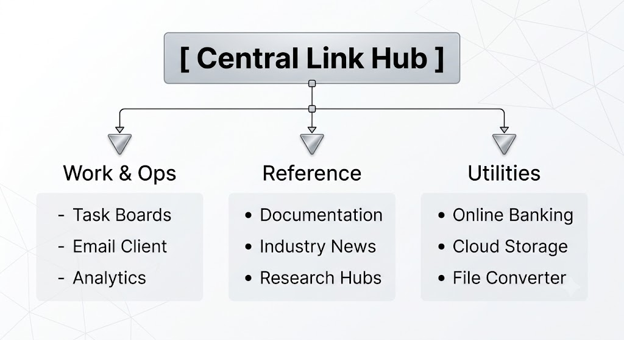

Evaluation of Organization Platforms
Selecting the appropriate platform will be based on your priorities. Ask yourself whether you require it to work on other devices. It may be necessary for you to have something fast on the screen. You may prioritize privacy over anything else.
- Web Dedicated Aggregators: Provide simple webpages with grid search capabilities. No installation is required for it on your system.
- Browser Native Start Pages: Function well within your browser and are synchronized. But you may not be able to set up your own layout.
- Privacy-First Local Vaults: Keep your links on your own computer. This is good if you want better security.
| Feature Metric | Web Aggregators | Native Browser Folders | Local Vaults |
| Access Speed | Instant (Grid) | Moderate (Dropdowns) | Instant (Hotkey) |
| Cross-Device Sync | Automatic | Account-Dependent | Manual Sync Required |
| Setup Complexity | Low | Very Low | Moderate |
Making an organized Link collection (링크모음) hub your main spot for links helps you use the web with ease. It makes finding things fast and smooth. It also helps you get more done when you browse online.
Link Organization for the Long Term
For your portal to remain efficient throughout its use, there is a need for routine maintenance in order to prevent your links from becoming cluttered. Having a simple process that allows you to do quarterly checks enables you to eliminate all the broken links, expired links for projects, and any old bookmarks. It also helps you add all the newfound web destinations into the pre-existing categories in your portal. In this way, your portal remains uncluttered and only consists of working and highly trafficked tools.
Navigational Hub Queries
How does centralizing bookmarks improve browsing speed?
It takes away the need for you to type web addresses by hand or look through folders. One can access any item using just a single click on a grid that is clearly visible to them. This enables faster loading of items by up to 80%.
Are web-based link hubs safe to use for sensitive sites?
Yes, it is possible to accomplish this as long as the links used have public access rather than a login or session token requirement. This helps keep accounts safe.
Can I sync my organized bookmark layout across multiple devices?
Most web-based aggregators and start pages that work with browsers update by themselves. They do this using desktops, tablets, and smartphones.
How often should I audit and fix my link list?
It is important to do it from time to time to remove any dead links. Moreover, this process will keep your main navigation clean and help your visitors access the most-visited pages.
Efficient Digital Workflows through Streamlining
Switching to a link manager system will make digital tasks effortless. This system removes the stress that comes with using the Internet every day. You are guaranteed to access necessary websites without getting distracted. By positioning high-traffic links in one place on your start page, you save time and organize your browser. An organized environment will prepare you for professional as well as personal tasks. These small things can make you a productive person on a daily basis. Organizing tabs saves a lot of your time as well as creates a proper workflow.
To read more content like this, explore The Brand Hopper
Subscribe to our newsletter
Go to the full page to view and submit the form.