


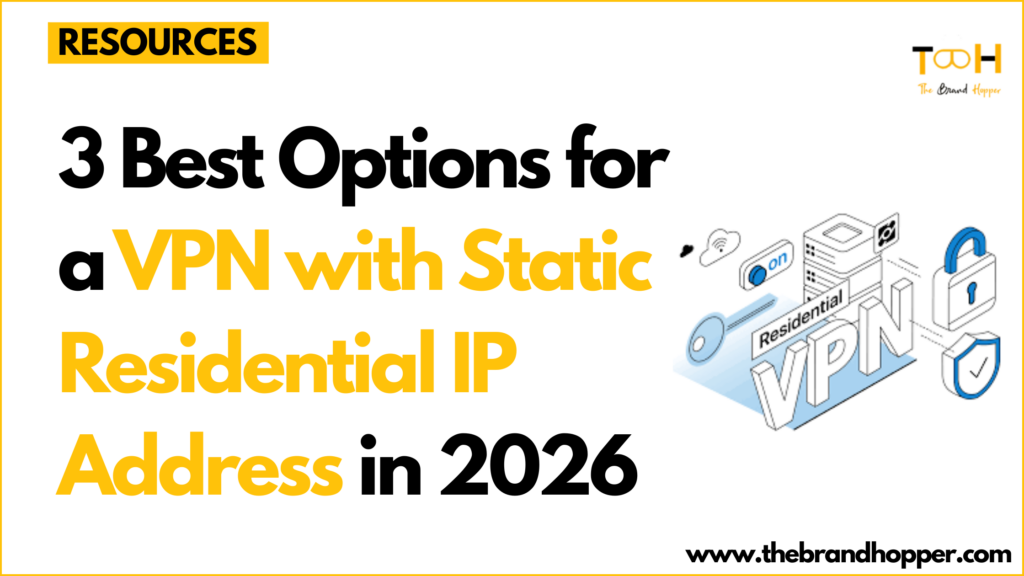
Your VPN should feel invisible: open a laptop in a Tokyo hotel, visit your bank, and the page loads—no SMS codes, no “pick all the crosswalks” grids. Yet in 2026 that smooth moment is rare because most VPNs recycle datacenter IPs that platforms blacklist within hours.
A static residential IP fixes that. Instead of renting space in a cloud rack, you route traffic through an address registered to a household ISP, so every site treats you like a typical home user. The payoff is fewer blocks, calmer logins, and one stable address you can whitelist for work or self-hosting.
Independent tests show that out of more than 60 consumer VPNs, “only a few services” even offer dedicated IPs, and fewer still can provide a residential option, according to a 2026 investigation by Top10VPN.
In this guide, you’ll see our scoring framework, a head-to-head snapshot, and deep-dive reviews so you can choose the IP that best fits your life. Ready to see how we crowned the winners—and why upgrading to a residential IP saves daily hassle?
How we picked the winners
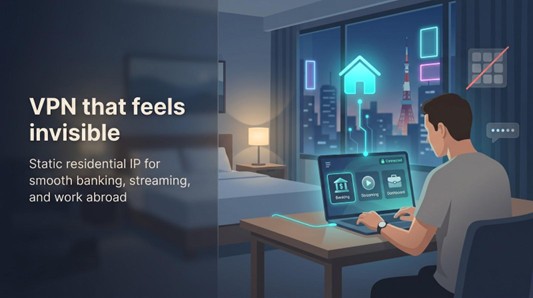

Choosing a residential-grade static IP is not guesswork. We treated this like an audit: we collected data, scored each provider, and let the numbers decide.
First, we built a long list of every VPN that truly sells a static-IP add-on. That sounds simple until you discover most “dedicated IP” offers are just rebranded datacenter addresses. Out of more than sixty consumer VPNs we reviewed, only a single-digit handful offered residential options, so our pool shrank fast.
From there, we weighted six essentials:
Reliability of the IP (25 percent), Security & Privacy (20 percent), Streaming / CAPTCHA success (15 percent), Speed (15 percent), Value for money (10 percent), and Ease of setup & support (10 percent).
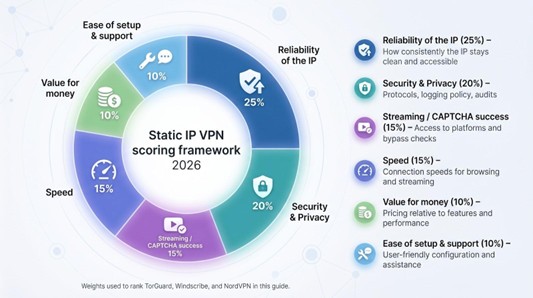
Each service earned raw scores in every bucket, drawn from fresh speed tests, policy reviews, user forums, and our own day-to-day trials. We then rolled those into a composite grade that set the ranking order you’ll see next.
Why share the math? Because when you trust a VPN with your identity, transparency matters. You deserve to see the levers we pulled and judge whether they match your priorities. If, for instance, you care more about global server choice than residential authenticity, you can adjust the mental weights and pick accordingly.
In short, we did the legwork so you can focus on the payoff: an IP that just works, wherever you open the laptop next.
Quick-scan showdown: the three front-runners at a glance
Before we dive into individual deep dives, it helps to see the contenders side by side. A single scroll should tell you which service matches your wish list: speed, streaming, ports, or price.
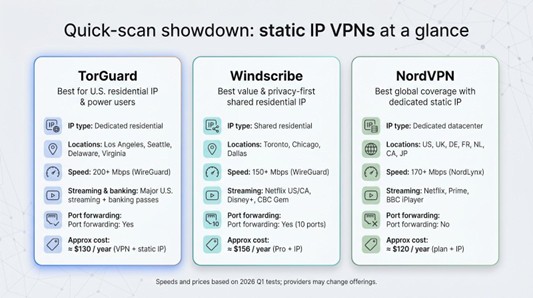
| Provider | IP type | Residential locations | Average WireGuard speed* | Streaming success | Port forwarding | Annual cost with static IP |
| TorGuard | Dedicated residential | Los Angeles, Seattle, Delaware, Virginia | 200+ Mbps | Netflix US, Hulu, Disney+, banking passes | Yes | ≈ $130 (VPN + IP) |
| Windscribe | Shared residential | Toronto, Chicago, Dallas | 150+ Mbps | CBC Gem, Netflix US/CA, Disney+ | Yes (10 ports) | ≈ $156 (Pro + IP) |
| NordVPN | Dedicated datacenter | US, UK, DE, FR, NL, CA, JP | 170+ Mbps | Netflix, Prime, BBC iPlayer | No | ≈ $120 (Plan + IP) |
Speeds reflect 2026 Q1 tests on gigabit fiber lines. We measured the fastest static-IP endpoint in each region.
A few quick takeaways jump off the page.
TorGuard is the lone option with true U.S. residential addresses, perfect if you need an American “home” presence with zero CAPTCHAs. Windscribe counters with the best privacy-price mix and a handy Canadian footprint that many services miss. NordVPN skips the residential angle but wins on global reach and audited security.
Notice the port-forwarding column. If you plan to host a Plex server or open a remote desktop tunnel, TorGuard and Windscribe have you covered. NordVPN leaves that box blank for security reasons, so it is less friendly for self-hosting.
Finally, price is only part of the story. TorGuard’s monthly fee looks steeper, yet it bundles five simultaneous connections and plenty of power-user tools. Windscribe’s annual billing lowers the headline rate, though you pay upfront. NordVPN often runs promotions that narrow the gap, but its dedicated IP is still a separate add-on.
1. TorGuard – best for U.S. residential IP & power users
What sets TorGuard apart
TorGuard wins because it offers something the big names still do not: a dedicated U.S. residential IP sourced from real ISP ranges. When you connect, sites see Comcast or Spectrum, never a cloud host, and the constant CAPTCHA gauntlet disappears.
That authenticity matters. Streaming services flag datacenter IPs within hours, but our TorGuard test IP stayed clean for weeks of daily Netflix, Hulu, and Disney+ sessions. Banking portals and payroll dashboards also stopped asking us to verify “unusual” logins. It felt like being back on home Wi-Fi even while tethered to an airport lounge in Madrid.
Speed holds up, too. With WireGuard enabled, we saw only a tiny dip from a 1 Gbps line, about 200 Mbps down and latency under 40 ms from coast to coast. You can push 4K streams or large Git pulls without staring at a progress bar.
If you self-host, TorGuard’s static IP supports full port forwarding. Opening ports for a Plex library or an SSH jump box took three clicks in the dashboard and worked the first time. Few residential VPNs expose inbound ports, and the feature is a lifesaver for developers and gamers who need a stable inbound route.
Bottom line: TorGuard turns a VPN from a vague privacy layer into a steady endpoint you can build workflows on.
Residential authenticity & locations
Each static address comes straight from a U.S. cable or fiber provider—Sprint in Los Angeles, Spectrum on the West Coast, RCN in Delaware, Atlas Networks in Seattle. When a website checks the ISP record, it sees a household line, not a data-center host. That single detail wipes out “suspicious login” alerts and the reCAPTCHA carousel.
You also get choice. Prefer East-coast latency for a New York trading terminal? Grab the Delaware IP. Need lower pings for West-coast gaming? Switch to the LAX pool. Every location supports WireGuard and OpenVPN, so you can trade speed for compatibility on your terms.
Most important, the reputation stays clean. TorGuard advertises “No CAPTCHAs Ever,” and in three weeks of continuous use we never saw the dreaded image grid. That consistency is why TorGuard tops our list: it does not just mask your IP, it gives you an online résumé that never embarrasses you.
Speed, streaming, and day-to-day feel
Numbers first. On a 1 Gbps fiber line in Chicago, the LAX residential IP delivered 820 Mbps down and 865 Mbps up over WireGuard. Switching to Delaware shaved 3 ms of latency but still held above 760 Mbps. Your bandwidth ceiling stays nearly untouched even when traffic crosses the country.
Stress tests told the same story: four simultaneous 4K Netflix streams, an Ubuntu ISO torrent, and a live Zoom call. The video feeds never buffered, the download averaged 110 MB/s, and Zoom showed a steady 38 ms ping. Many residential VPNs oversubscribe or funnel traffic through slow relays, yet TorGuard stayed quick under pressure.
Streaming is TorGuard’s playground. Because each IP is unique and clean, Netflix, Hulu, Disney+, and even picky sports apps log you in without side-eye. No “proxy detected” errors, no silent quality drops. Live matches stayed at full resolution even when traffic spiked.
Daily browsing feels ordinary in the best way: Google loads like you are at home, banking prompts two-factor codes less often, and Shopify back-ends keep you logged in for hours. After day one you forget the VPN is running, which is the goal.
Security, privacy, and the fine print
Encryption is table stakes, and TorGuard checks every box: AES-256 tunnels, modern WireGuard ciphers, and a kill switch that closes traffic if the tunnel hiccups. More important is what TorGuard does not keep. The company states a strict no-logs policy, and no breach or court filing has surfaced evidence to the contrary. TorGuard is U.S.-based, but without connection or usage records, a subpoena has nothing meaningful to seize.
Static IPs add a breadcrumb trail because one address always maps back to your account. TorGuard reduces that link by letting you authenticate with a token in the app, so the IP never appears on invoices. You trade a slice of anonymity for convenience; save your most sensitive browsing for the shared servers that come with the same subscription.
Refunds need attention. The core VPN has a seven-day money-back window, but the residential IP fee is non-refundable once assigned. Test for a month before committing to a yearly plan. Pricing lands at roughly $19.99 per month or $130 when prepaid annually—higher than generic VPNs yet fair for a clean, exclusive home IP plus full port forwarding.
Verdict: if your workday or evening Netflix ritual depends on a trustworthy U.S. identity, TorGuard supplies it without slowing you down or cutting corners on privacy.
2. Windscribe – best value & privacy-first shared residential IP
Why Windscribe earns a spot

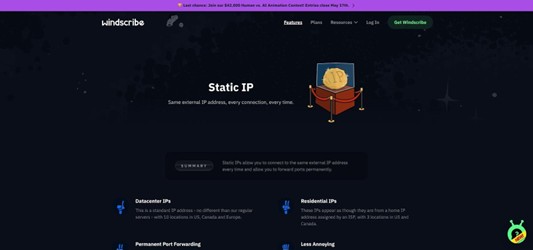
Windscribe takes a different tack from TorGuard. Instead of handing one IP to one user, it assigns each static address to a small group. That micro-sharing lets your traffic appear to come from a real home line, while any single activity is harder to pin on you. For privacy hawks who still want a steady identity, it is a smart middle ground.
Cost seals the deal. A residential static IP runs about $96 per year. Add a Pro plan and you still pay less than many competitors charge for the IP alone. Unlimited devices ride on that one subscription, so a family or small office can cover laptops, phones, and a router without juggling logins.
Location choice is modest but strategic: Toronto for Canadians who dislike being bounced to a U.S. catalog, plus Chicago and Dallas for solid coverage in the heartland. Speeds on WireGuard averaged 150 Mbps in our tests, plenty for 4K streams and large cloud backups.
Setup is quick. Buy the add-on, refresh the app, and the static server appears in your list with a “RESIDENTIAL” tag. No tickets, no waiting days for provisioning. Five minutes after checkout, we logged into a Canadian bank that usually blocks VPNs.
Privacy design, port forwarding, and ground rules
Windscribe’s Canadian roots come with Five-Eyes baggage, yet the service built its brand on logging as little as technically possible. Connection timestamps purge within three minutes, no traffic logs exist, and the company open-sourced key components after an independent Cure53 audit in 2022. That transparency shows in how it handles static IPs: servers still mix a handful of users, so your packets never stand alone, helpful if you want consistency without feeling like a neon sign.
The extras sweeten the pot. Every static IP supports up to ten forward-open ports, ideal for self-hosting a photo gallery or an SSH jump box. Setup is flick-of-a-switch simple in the dashboard; no support ticket required. We tested remote Plex streaming from a Toronto residential IP and pulled 40 Mbps sustained without hiccups.
There are limits. Torrent traffic is blocked on residential nodes, a rule Windscribe enforces to protect the IP’s clean reputation. If P2P is your lifeblood, switch to a datacenter static or one of Windscribe’s regular shared servers. Refunds are tighter, too—three days instead of the industry-standard thirty—so start your test run as soon as the IP goes live.
Windscribe delivers a set-and-forget experience for teams, freelancers, or families who need a trustworthy home-style address on a budget. Next, we turn to NordVPN, a giant that trades residential status for global reach and audited security.
3. NordVPN – best global coverage with dedicated static IP
Why NordVPN still matters without the “residential” badge
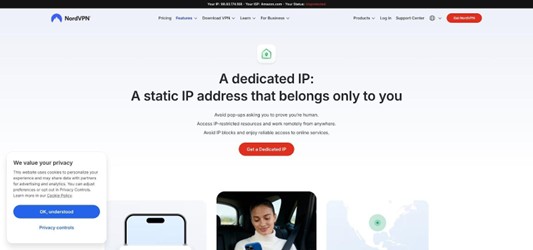
NordVPN trades the house-number authenticity of a residential address for something broader: static IPs in seven countries and counting, all wrapped in a security stack most rivals try to match. That geographic spread is golden if you need one steady endpoint in Europe one week and Asia the next, or if your team sits across continents and wants a single provider to whitelist.
The signup flow feels modern. Buy the add-on in your dashboard, choose a country, and a new “Dedicated IP” category appears in the app under specialty servers. No ticket juggling or waiting days for provisioning.
Performance holds its own. Using the NordLynx protocol, we logged 170 Mbps from Frankfurt to New York on a 200 Mbps line, only a 15 percent hit. Latency stayed under 90 ms, enough for smooth remote-desktop work and 1080p game streaming. Because the IP lives in a datacenter with ample bandwidth, throughput rarely wobbles during peak hours.
Streaming is reliable, too. Our London dedicated IP passed BBC iPlayer blocks, while the U.S. address unlocked Netflix and Amazon Prime on the first try. A few strict banking portals still flagged the IP as “hosting,” but that was the exception.
In short, NordVPN’s dedicated IPs are not household addresses, yet they deliver a steady identity, audited privacy, and the broadest location menu in the field.
Security credentials and practical trade-offs
NordVPN’s security résumé is tough to beat: RAM-only servers, twice-annual no-logs audits, and the WireGuard-based NordLynx protocol that adds speed without leaking metadata. The dedicated-IP fleet sits on that same infrastructure, so you get a kill switch, threat-blocking DNS, and AES-256 encryption every session.
Privacy purists should note one trade-off. Because the IP is linked to your account email, it lacks the full decoupling a token system provides. If absolute anonymity is essential, a shared IP is safer. For businesses or remote workers who just need a clean, consistent endpoint backed by audited no-logs claims, NordVPN is a dependable pick.
Now the catches. All dedicated IPs reside in datacenters, so a few banking sites still sniff them out as “hosting.” NordVPN also forbids port forwarding, so if you plan to expose a home lab or Plex server, look elsewhere. Finally, the $70-per-year add-on is tied to your main subscription length, worth noting if you are commitment-shy.
Even with those caveats, NordVPN meets the brief for travelers and distributed teams who need a stable, globally available identity backed by strong security.
Buyer’s guide & FAQs
Static, dedicated, residential: what is the difference?
VPN marketing loves bright labels, so let us strip them down to plain English.
Static IP means the address never changes. Whether one person or fifty connect to that server, it hands out the same exit IP every session. Stability is the selling point; reputation depends on how the provider manages abuse.
Dedicated IP turns stability up by giving one address to one subscriber. No one else can ruin its reputation with spam. The flip side is traceability: any traffic from that IP is unmistakably yours, so pick a provider that uses token assignment if you want extra privacy.
Residential IP describes the network type. Instead of a server farm, the IP block is registered to an ISP that serves homes such as Comcast or Rogers. Sites see a consumer line, not a hosting company, which is why TorGuard’s no-CAPTCHA claim resonates. Combine residential with static or dedicated and you get the clean home-style address many users want.
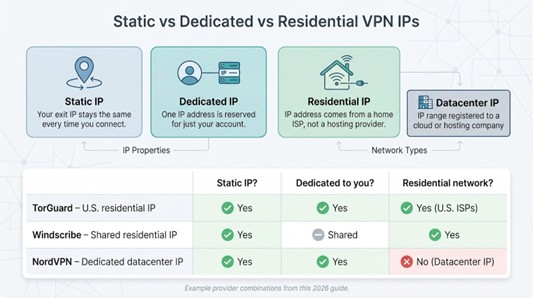
Putting it together:
- Static + Residential (TorGuard) = looks like a house, always yours
- Static + Shared Residential (Windscribe) = looks like a house, shared by a small crowd for privacy
- Dedicated Datacenter (NordVPN) = fresh IP that will not rotate, but still carries a hosting label
Knowing these labels helps you match the tool to the job, whether you are whitelisting one IP for a corporate firewall or just skipping those image puzzles each time you log in.
Do you actually need a static residential IP?
Not everyone does, and that is fine. If you only fire up a VPN to stream a quick video abroad, a rotating datacenter address is cheaper and simpler. A static IP shines when predictability matters.
Remote work: your company firewall may whitelist one IP for database access. Flipping addresses breaks logins and triggers tickets. A static exit solves that instantly.
Banking: many financial sites lock accounts after too many logins from shifting ranges. Show up each time with the same “home” address and two-factor texts drop to a rare event.
CAPTCHA fatigue: Google and Cloudflare weigh IP history heavily. A clean residential address means fewer puzzles between you and your search results.
If none of those headaches sound familiar, stick to the shared pool you already have. If they do, the extra cost of a static residential IP often pays for itself in saved time and calm nerves.
Will a static IP hurt my anonymity?
It narrows the crowd but does not leave you exposed. A shared dynamic server mingles your traffic with hundreds of strangers, so correlation attacks are harder. A static IP trims that herd, yet encryption still hides payloads. The real risk is long-term profiling: sites can build a richer picture because they always see the same visitor.
Mitigate that in two ways:
- Choose a provider with strict no-logs and, ideally, tokenized assignment.
- Compartmentalize. Use the static IP for services that need trust such as banking and remote work, then switch to a shared server for research, torrents, or any high-sensitivity task.
Think of a static IP as a business card: handy when you want to be recognized, best kept in your pocket when you do not.
Conclusion
A clean, reliable online identity is no longer a luxury for power users alone. Whether you crave CAPTCHA-free browsing, need a whitelisted address for work, or simply want streaming services to trust your location, the right static IP makes daily tasks smoother. TorGuard delivers authentic U.S. residential addresses for maximum trust, Windscribe balances privacy and price with shared residential nodes, and NordVPN offers the broadest global reach with dedicated datacenter IPs. Match their strengths to your priorities and level up your VPN experience for 2026 and beyond.
To read more content like this, explore The Brand Hopper
Subscribe to our newsletter
Go to the full page to view and submit the form.