


Notion and ClickUp both aim to reduce the number of apps teams need to manage their work. They combine documentation, task management, collaboration, and AI-powered features, but their approaches to productivity remain different.
Notion evolved from a flexible workspace for notes, documents, and databases, while ClickUp developed around task and project management before expanding into documentation, chat, meetings, and AI. In this Notion vs ClickUp comparison, we examine their features, AI capabilities, pricing, ease of use, integrations, security, and suitability for different teams.
Quick Verdict: Choose Notion if your work revolves around documentation, knowledge management, writing, and flexible databases. Choose ClickUp if you need structured project management, workload planning, time tracking, reporting, and integrated team collaboration.
Notion vs ClickUp at a Glance
| Factor | Notion | ClickUp |
|---|---|---|
| Founded | 2013 | 2017 |
| Founders | Ivan Zhao and Simon Last, among others | Zeb Evans and Alex Yurkowski |
| Core strength | Documentation, wikis, flexible databases | Tasks, projects, and workflows |
| Reported users | 100 million+ in September 2024 | 20 million+ in September 2025 |
| Reported valuation | Approximately $11 billion in a reported employee tender offer discussed in 2025 | $4 billion in its October 2021 Series C funding round |
| Free plan | Yes | Yes, Free Forever |
| Paid plans | Plus, Business, Enterprise | Core, Business, Enterprise, Max in the newer pricing structure |
| AI capabilities | Notion Agent, Custom Agents, AI Meeting Notes, Enterprise Search | ClickUp Brain, Super Agents, AI Notetaker, AI automations |
| Best suited for | Writers, knowledge workers, and documentation-heavy teams | Project managers, agencies, operations, and product teams |
What Is Notion?
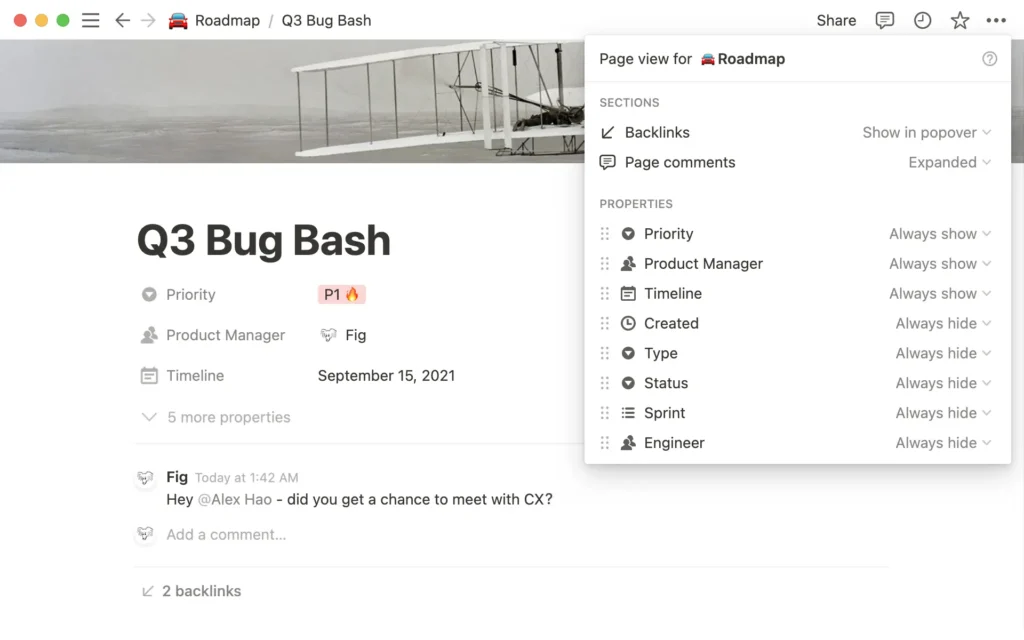
Notion is an all-in-one workspace built around pages, blocks, and databases. Users can combine text, tasks, tables, images, and embedded content to create everything from personal notes and company wikis to project trackers, content calendars, and product roadmaps.

The company was founded in 2013 by Ivan Zhao and a small team that included Simon Last. Notion 1.0 launched in 2016, establishing the foundation for its flexible, block-based workspace.
Notion has since expanded beyond its original documentation focus. Notion Calendar, developed from the acquisition of Cron, launched in January 2024, while Notion 3.0 introduced a major evolution of its AI capabilities in September 2025.
In February 2026, Notion introduced Custom Agents, designed to handle recurring tasks and workflows across Notion and connected tools. The company also announced the discontinuation of its standalone Notion Mail inbox, which shut down on 22 September 2026, as it shifted its focus towards AI-powered email workflows.
Notion reported surpassing 100 million users in September 2024. In December 2025, Bloomberg reported discussions around a tender offer valuing the company at approximately $12 billion, while other reporting and estimates put its annual recurring revenue above $600 million. These financial figures should be treated as reported estimates rather than audited public-company disclosures.
What Is ClickUp?
ClickUp is a work-management platform founded in 2017 by Zeb Evans and Alex Yurkowski. Its goal is to bring tasks, documents, whiteboards, chat, goals, dashboards, calendars, and meetings into a unified workspace.
The platform initially focused on project and task management but has expanded into a broader productivity and AI platform. Its tools are designed to connect day-to-day execution with communication, reporting, and workflow automation.

ClickUp raised $400 million in Series C funding in October 2021 at a reported valuation of $4 billion. In September 2025, the company reported more than 20 million users and over $300 million in annual recurring revenue.
ClickUp 4.0 introduced a redesigned workspace experience that brings tasks, Docs, Chat, and AI tools into a more unified interface. Subsequent AI developments have expanded the role of ClickUp Brain and Super Agents in automating work and connecting information across the platform.
In May 2026, ClickUp announced a workforce reduction of approximately 22%. CEO Zeb Evans publicly described the move as part of a strategy to reorganise the company around AI-driven productivity and higher-impact roles. The development may be relevant to buyers assessing vendor stability, although a workforce reduction alone does not establish a company’s financial condition or future reliability.
Features Compared
1. Docs and Knowledge Management
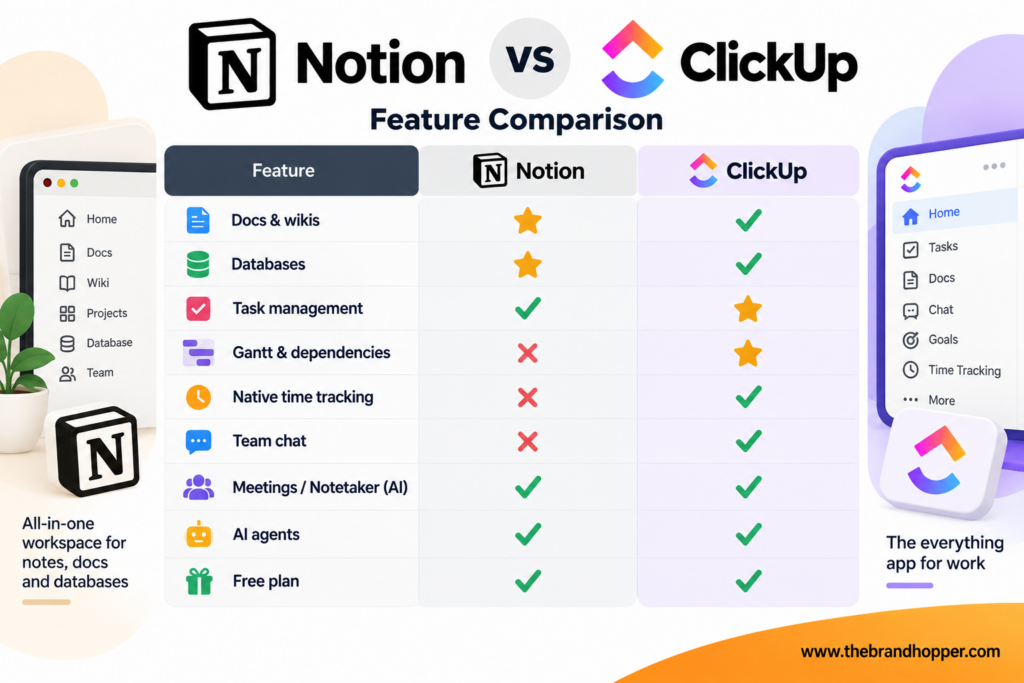
Notion’s biggest strength is its flexible documentation environment. Its editor, nested pages, linked databases, and multiple database views make it suitable for company wikis, standard operating procedures, meeting notes, research, content calendars, and personal knowledge bases.
ClickUp Docs also supports nested pages, collaboration, and connections between documentation and tasks. Users can turn written content into actionable work, making it particularly useful when documentation needs to support project execution.
Docs winner: Notion. Its flexible page structure and knowledge-management capabilities make it a strong choice for teams that create, maintain, and search large amounts of documentation.
2. Task and Project Management
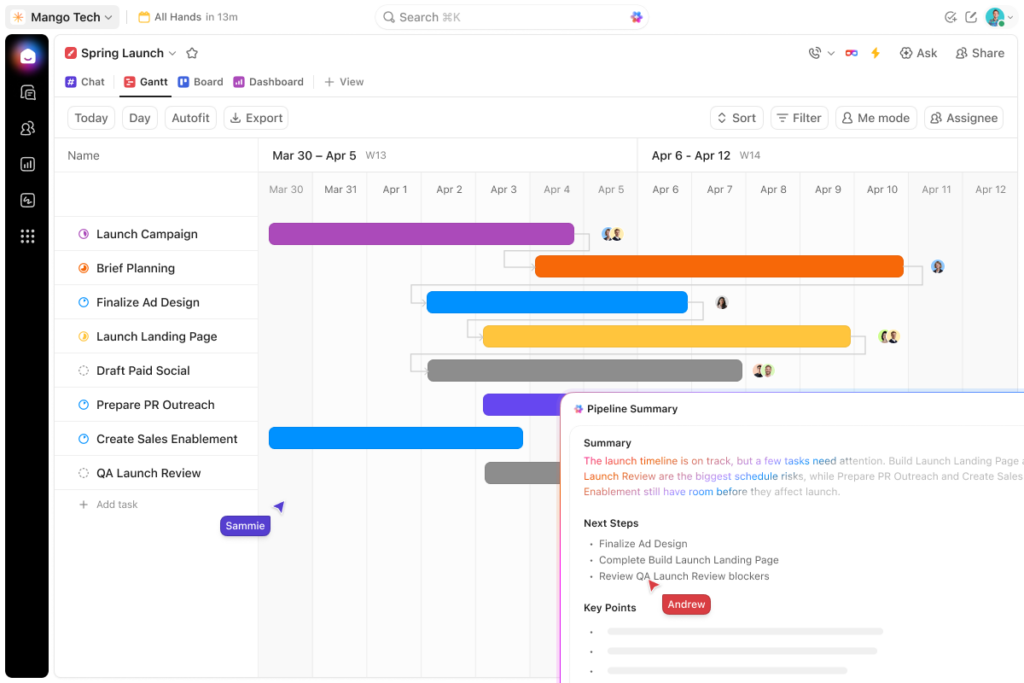
ClickUp provides a more extensive project-management toolkit, including task hierarchies, dependencies, Gantt charts, workload views, sprints, goals, native time tracking, and dashboards. These capabilities help teams coordinate deadlines, resource allocation, and project performance within one workspace.
Notion supports project tracking through databases, task lists, timelines, dependencies, and sprint-oriented workflows. However, teams managing complex portfolios or resource-intensive projects may need more configuration or external tools to match ClickUp’s project-management depth.
Project management winner: ClickUp. Its dedicated project controls make it better suited to teams managing complex workflows, multiple deadlines, and detailed operational reporting.
3. Collaboration, Chat, and Meetings
ClickUp combines task management with Docs, Chat, and meeting-related capabilities. Its connected workspace lets teams turn conversations into tasks, link discussions to projects, and use AI tools to summarise work and meetings.
Notion focuses more on shared pages, comments, mentions, documentation, and connected applications. Its AI Meeting Notes feature supports meeting transcription and summaries, while teams that need persistent real-time chat will generally continue to use a dedicated communication tool.
Collaboration winner: ClickUp for teams that want project work and communication in one environment. Notion remains compelling for teams whose collaboration primarily revolves around documents and shared knowledge.
4. Views, Templates, and Customisation
Both platforms provide different ways to organise and visualise information. Notion supports flexible databases and views, including tables, boards, calendars, timelines, and galleries, alongside a broad ecosystem of templates.
ClickUp offers task views, custom fields, custom statuses, task types, and templates that support repeatable operational processes. Its configuration options can be especially valuable when multiple teams need consistent workflows and reporting standards.
Verdict: Notion is particularly flexible for organising information, while ClickUp is well suited to standardising and monitoring execution-oriented processes.
AI Features: Notion AI vs ClickUp Brain
AI has become a major part of both platforms, but their strengths differ according to the work being performed.
Notion: Notion Agent can perform multi-step tasks using information from the workspace and connected sources. Business and Enterprise plans list features such as Notion Agent, AI Meeting Notes, and Enterprise Search, although feature availability and limits should be checked against the current plan.
Notion Custom Agents can automate recurring tasks, such as compiling status reports, answering repeat questions, and routing work. They were introduced in February 2026, and their usage moved to a credit-based model from 4 May 2026. Notion’s updated credit documentation also describes changes to how Business and Enterprise workspaces fund agent usage, with rollout dates beginning in October and November 2026.
ClickUp: ClickUp Brain connects AI capabilities with tasks, documents, and collaboration workflows. Its wider AI offering includes AI-assisted writing, search, meeting summaries, task-related automation, and Super Agents, with availability and usage limits varying by plan and add-on.
ClickUp’s newer pricing information lists monthly AI credit allowances for paid plans, while certain higher-tier AI packages offer expanded or unlimited access to specific features subject to their terms and fair-use policies. Buyers should distinguish between the standard work-management subscription and additional AI capabilities when calculating the total cost.
AI verdict: It depends on the workflow. Notion is particularly attractive for knowledge retrieval, documentation, and agents working with information. ClickUp is a strong option for AI-assisted project execution, task updates, and operational automation.
Pricing Compared
Notion and ClickUp both offer free plans and paid subscriptions. However, their pricing pages and plan structures have changed, and ClickUp’s newer plan names have appeared alongside older plan listings during the transition.
The following comparison reflects the published pricing information available for the newer plan structures. Prices are in US dollars per user or member per month, and promotional rates, billing periods, regional taxes, and AI add-ons can affect the final cost.
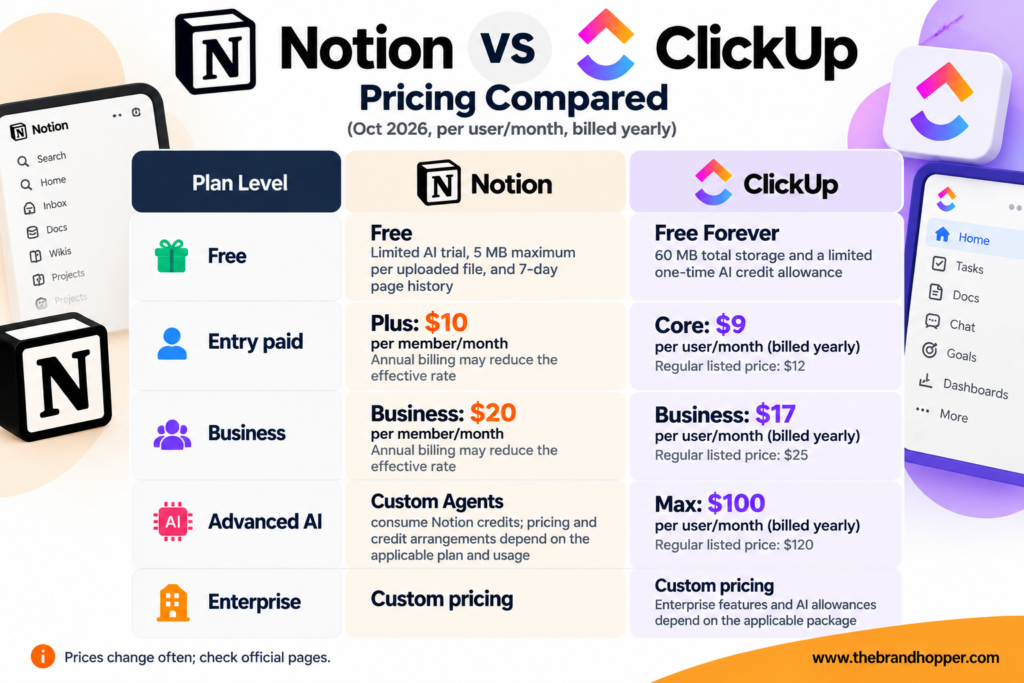
Sources: Notion’s official pricing page and ClickUp’s official pricing information and published plan comparisons. ClickUp has also displayed an older structure with Unlimited at $7/month and Business at $12/month when billed yearly. Confirm the currently available plan, price, and included AI allowance on the checkout page before purchasing.
For a 10-person team, Notion Business at the listed $20 rate would amount to $200 per month before applicable taxes or discounts. ClickUp Business at the newer $17 annual-billing rate would amount to $170 per month before taxes, provided that rate is available to the buyer.
The difference is not limited to subscription fees. Notion’s Custom Agents use credits, while ClickUp’s AI capabilities have plan-specific allowances and optional higher-tier AI packages. Teams should compare the complete cost of the features they actually need rather than the base subscription alone.
Pricing winner: ClickUp on the newer listed entry-level and Business rates, if those rates are available at checkout. Notion may still offer better value for teams that prioritise documentation and knowledge management, particularly if they do not require extensive project-management features.
Ease of Use
Notion’s minimalist interface and page-based structure can make it approachable for individuals and small teams. Users can begin with simple notes and documents, then gradually introduce databases and more complex systems as their needs evolve.
ClickUp provides more dedicated project-management controls, but its many views, settings, statuses, and workflow options can increase the initial learning curve. Its redesigned interface aims to make the workspace more cohesive, although teams may still need time to configure it effectively.
Ease-of-use winner: Notion for most users who primarily need notes, documentation, and straightforward organisation. ClickUp may be more efficient once a project-oriented team has established its workflows.
Integrations and Automation
Both platforms connect with external applications and provide ways to extend their functionality. Notion supports connections with tools such as Slack and GitHub, alongside APIs and developer capabilities for syncing data and building integrations.
ClickUp integrates project work with external services and offers automation features for managing task updates, assignments, and repeatable processes. Its automation allowances vary by plan, so teams with high-volume workflows should check the relevant limits.
For organisations that depend on custom integrations, both platforms should be evaluated against the exact applications, permissions, data flows, and automation triggers required. Integration availability does not necessarily mean that every feature is included in every subscription tier.
Security and Enterprise Readiness
Both platforms offer security and administration features intended for business use, but the available controls vary by plan. Notion lists SAML single sign-on on Business and additional controls such as SCIM provisioning, audit logs, and zero data retention with AI model providers on Enterprise.
ClickUp lists Google SSO on its Business plan in its established pricing structure, with SAML SSO, SCIM provisioning, audit logs, and additional governance capabilities available at the Enterprise level. Exact entitlements should be verified against the plan currently offered to the organisation.
Large organisations should compare the vendors’ current security documentation, compliance certifications, data residency options, retention policies, and contractual terms before selecting either platform. They should also review how each product’s AI features process workspace data.
Notion vs ClickUp: Pros and Cons
Notion Pros
- Strong documentation, wiki, and knowledge-management capabilities.
- Flexible databases and a broad template ecosystem.
- A clean interface suited to writing and organising information.
- AI features for knowledge retrieval, document creation, and automated workflows.
- Suitable for individuals as well as teams building internal knowledge bases.
Notion Cons
- Less specialised than ClickUp for complex project and resource management.
- No equivalent built-in depth of native time tracking and project workload controls.
- Custom Agents require credits, making usage costs important to consider.
- Teams needing real-time chat may require a separate communication tool.
- Some advanced administrative and security controls require Enterprise.
ClickUp Pros
- Extensive project-management tools, including Gantt charts, workload views, and time tracking.
- Tasks, Docs, Chat, and other collaboration features in one workspace.
- AI capabilities that can support task execution and workflow automation.
- Custom statuses, dashboards, and reporting for repeatable processes.
- Multiple subscription and AI options for different operational requirements.
ClickUp Cons
- A steeper learning curve for teams that need only basic documentation and task tracking.
- The large number of settings and features can make initial configuration challenging.
- Pricing structures and AI allowances require careful checking during plan transitions.
- Documentation-heavy teams may prefer Notion’s page-based writing experience.
- The May 2026 workforce reduction may be a consideration for buyers evaluating organisational changes, but does not by itself establish product or vendor risk.
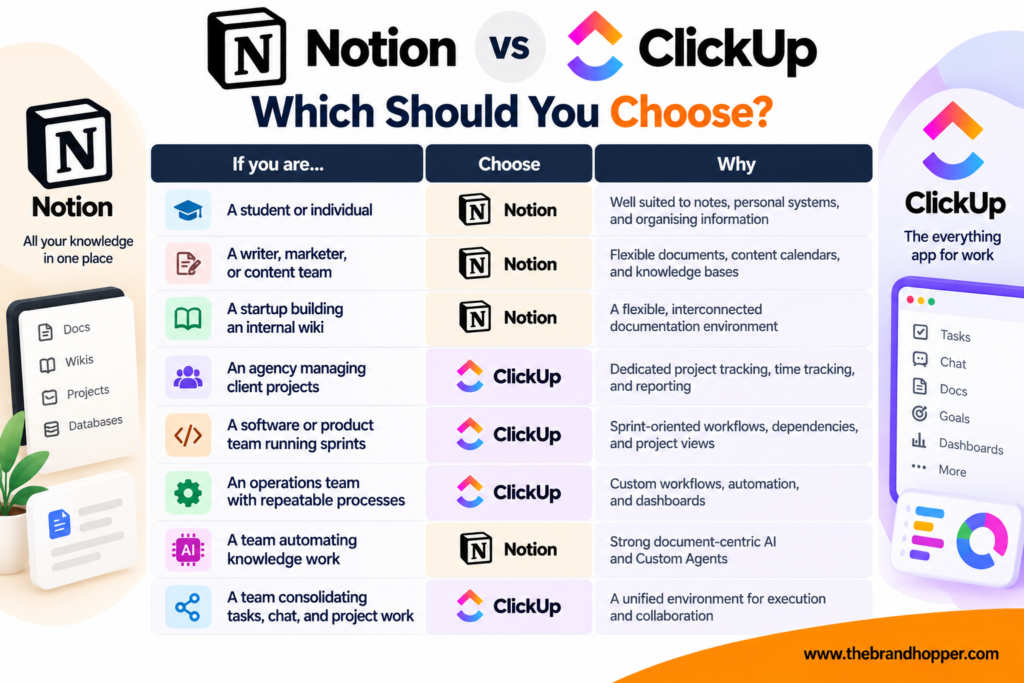
Which Should You Choose?

Final Verdict: Notion or ClickUp?
There is no single best productivity platform for every team. The right choice depends on whether the primary challenge is organising knowledge or coordinating execution.
Notion is the stronger choice for knowledge-centric work. Its flexible pages, databases, documentation capabilities, and AI features make it a compelling workspace for writers, marketers, researchers, startups, and teams that rely on shared knowledge.
ClickUp is the stronger choice for execution-centric work. Its project-management depth, time tracking, workload management, reporting, and integrated collaboration tools make it a good fit for agencies, product teams, and operations-heavy organisations.
If you are unsure, test both platforms using the same real project for a week. Compare how easily your team can organise information, assign work, track progress, and find what it needs, while checking the total cost of the features you plan to use.
Frequently Asked Questions
Q: Is Notion or ClickUp better?
A: Notion is generally better for documentation, wikis, and knowledge management, while ClickUp is better for complex project management, time tracking, and operational workflows. The right choice depends on how your team organises and executes its work.
Q: Is ClickUp cheaper than Notion?
A: ClickUp’s newer published pricing structure lists Core at $9 per user per month and Business at $17 per user per month when billed yearly. Notion lists Plus at $10 and Business at $20 per member per month, with annual-billing discounts potentially reducing the effective rate. Confirm the applicable prices and billing terms before comparing subscriptions.
Q: Does Notion have project-management features?
A: Yes. Notion supports project databases, task lists, board and calendar views, timelines, dependencies, and other project-oriented features. However, teams needing advanced workload management, native time tracking, and detailed project reporting may prefer ClickUp.
Q: Can ClickUp replace Notion?
A: ClickUp includes Docs and wiki capabilities, so it can replace Notion for teams whose documentation primarily supports project execution. Teams that depend heavily on interconnected knowledge bases, long-form documentation, and flexible page structures may prefer to keep Notion.
Q: Which has better AI, Notion or ClickUp?
A: Both offer useful AI capabilities, but their strengths differ. Notion is well suited to knowledge retrieval, writing, and document-centric agents, while ClickUp focuses on AI-assisted task execution, project workflows, and operational automation. Costs and usage limits depend on the applicable plan.
Q: Is Notion free to use?
A: Yes. Notion offers a Free plan for individuals, with limitations such as a 5 MB maximum file upload size and seven-day page history. AI capabilities on the free plan are limited, and team collaboration limits may apply.
Q: How many people use Notion and ClickUp?
A: Notion reported more than 100 million users in September 2024. ClickUp reported more than 20 million users in September 2025. These are company-reported historical figures from different dates, not a like-for-like measurement of their current user bases.
Q: Who owns Notion and ClickUp?
A: Both companies are privately held. Notion was co-founded by Ivan Zhao and is led by CEO Ivan Zhao, while ClickUp was founded by Zeb Evans and Alex Yurkowski and is led by CEO Zeb Evans. Both have received venture-capital funding from investors over their histories.
Also Read: Clickup – Founders, Business Model, Funding & Competitors
To read more content like this, subscribe to our newsletter
Go to the full page to view and submit the form.