


Slack vs Microsoft Teams is one of the defining rivalries in workplace collaboration. Slack, owned by Salesforce, popularised channel-based team messaging and is evolving into an AI-powered workspace where people and agents can work together.
Microsoft Teams, part of Microsoft’s productivity ecosystem, combines workplace chat, meetings, calling and file collaboration. Its strongest advantage is its integration with Microsoft 365, making it a natural choice for organisations already using Outlook, Word, Excel, SharePoint and OneDrive.
Both platforms have evolved significantly. Slack has included AI features in its paid plans and introduced Slackbot as a personal AI agent, while Microsoft has expanded Copilot and agent capabilities across its productivity products.
Microsoft also revised Microsoft 365 pricing effective July 2026 and offers business subscriptions both with and without Teams. This guide compares Slack and Microsoft Teams on pricing, free plans, messaging, meetings, AI, integrations, external collaboration, security and overall value.

Who Owns Slack and Microsoft Teams?
Slack
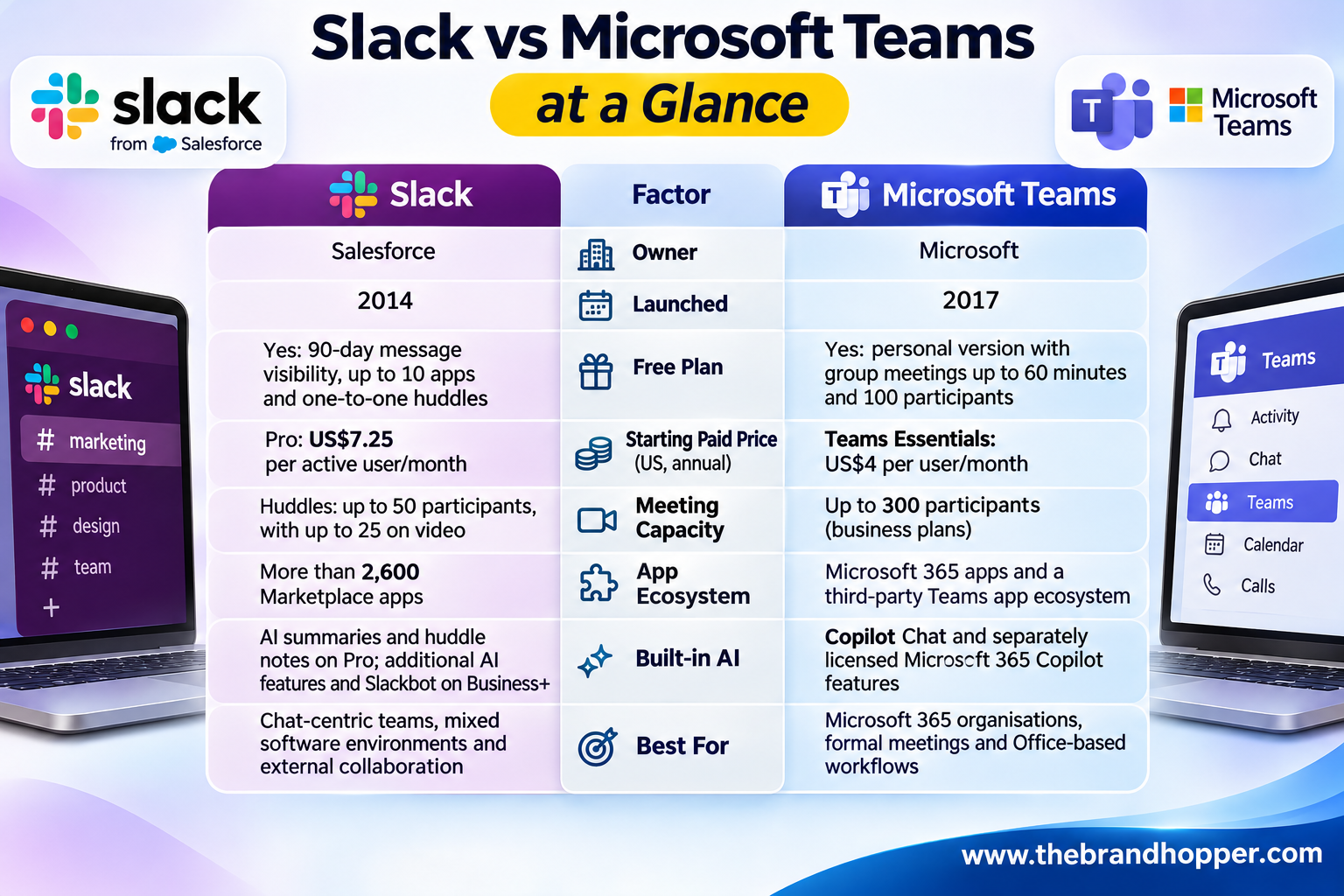
Slack was developed by Stewart Butterfield’s company, Tiny Speck, and launched publicly in 2014. It gained popularity among technology companies, startups and distributed teams because of its channel-based messaging and integrations.
Salesforce completed its acquisition of Slack in July 2021. The transaction had an announced enterprise value of approximately US$27.7 billion, making it one of Salesforce’s largest acquisitions.
Slack is now an important part of Salesforce’s strategy to build an AI-powered workplace. Salesforce is integrating its Agentforce platform and AI capabilities into Slack, positioning the product as a workspace where employees and AI agents can access information and complete tasks.
Salesforce does not disclose Slack’s standalone revenue. In FY2026, Salesforce reported total revenue of approximately US$41.5 billion, while its combined reporting category, “Agentforce 360 Platform, Slack and Other”, generated US$8.88 billion in subscription and support revenue. That figure includes other products and acquisition-related revenue, so it should not be treated as Slack’s individual revenue.
Salesforce also reported in November 2026 that users send approximately one billion messages on Slack each day, demonstrating the platform’s scale.
Microsoft Teams
Microsoft launched Teams in 2017 as a workplace communication and collaboration platform. Its adoption accelerated because it was integrated into Microsoft’s productivity ecosystem and became a central collaboration tool during the COVID-19 pandemic.
Microsoft last publicly reported more than 320 million monthly active Teams users in October 2023. It has not provided a newer comparable Teams monthly active user figure in the financial disclosures referenced here.
Microsoft reported FY2026 revenue of US$331.8 billion, an increase of 18% year over year. It also reported more than 30 million paid Microsoft 365 Copilot seats, reflecting the growing adoption of its AI-powered productivity products.
Teams benefits from its close integration with Microsoft 365, including Outlook, SharePoint, OneDrive, Word, Excel and PowerPoint. This makes it particularly attractive to organisations that already rely on Microsoft’s software ecosystem.
The EU unbundling battle
Slack filed a complaint with the European Commission in 2020, arguing that Microsoft’s bundling of Teams with Office gave the company an unfair competitive advantage.
In September 2025, the European Commission accepted Microsoft’s commitments in the Teams competition proceedings. These commitments include offering Microsoft 365 and Office suites without Teams at a lower price, improving interoperability with competing communication products and enabling customers to move Teams messaging data to alternative services.
The commitments generally run for seven years, with interoperability and data-portability obligations lasting ten years.
Microsoft now offers business subscriptions without Teams in its product lineup, including Microsoft 365 Business Basic and Business Standard without Teams. These options are available in the US as well as being relevant to Microsoft’s European commitments.
Context: Slack and Teams are backed by major technology companies with substantial resources. Neither platform is likely to disappear in the foreseeable future, so the choice should depend on your organisation’s workflow, software ecosystem, security requirements and budget.
Pricing: How Much Do Slack and Teams Cost in 2026?
Pricing is one of the biggest differences between Slack and Microsoft Teams. Slack is primarily a collaboration and messaging subscription, while Microsoft offers Teams as a standalone product and as part of broader Microsoft 365 business subscriptions.
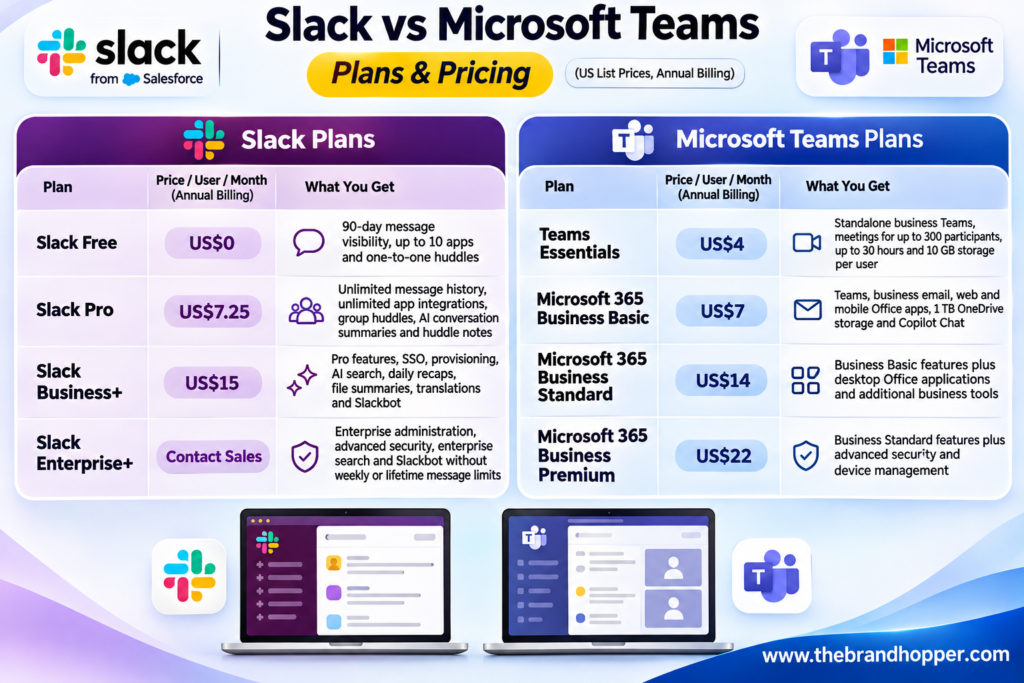
Slack Pro costs US$8.75 per active user per month when billed monthly, while Business+ costs US$18 per active user per month on monthly billing. Enterprise+ pricing is available through Slack’s sales team.
Microsoft’s July 2026 pricing changes increased Business Basic from US$6 to US$7 per user per month and Business Standard from US$12.50 to US$14. Business Premium remained at US$22.
Microsoft also sells business subscriptions without Teams. For example, Microsoft 365 Business Basic without Teams costs US$5.40 per user per month, while Business Standard without Teams costs US$10.79 on annual billing.
For organisations that need Microsoft 365 applications and business email, Business Basic can offer more value than buying Slack alone. However, Slack is often purchased alongside Microsoft 365 or Google Workspace, so its subscription can represent an additional collaboration expense.
Winner, pricing: Microsoft Teams, particularly for organisations that need business email, Office applications and cloud storage alongside collaboration tools.
Free Plans Compared
Both platforms offer free versions, but they serve different purposes.
Slack Free provides access to messages and files from the most recent 90 days, allows up to 10 third-party or custom apps, and restricts huddles to two participants. Messages and files older than one year may be permanently deleted under Slack’s free-plan retention rules.
Microsoft Teams Free is primarily designed for personal communication and small groups. It supports group meetings of up to 60 minutes and 100 participants, with 5 GB of cloud storage per user.
For businesses, Microsoft Teams Essentials is a more relevant entry-level option. It costs US$4 per user per month on annual billing and supports meetings with up to 300 participants, alongside 10 GB of storage per user.
Winner, free plan: Slack for trying a dedicated workplace messaging platform; Microsoft Teams Free for personal group meetings. For business use, Teams Essentials is the more appropriate comparison.
Messaging and Everyday Collaboration
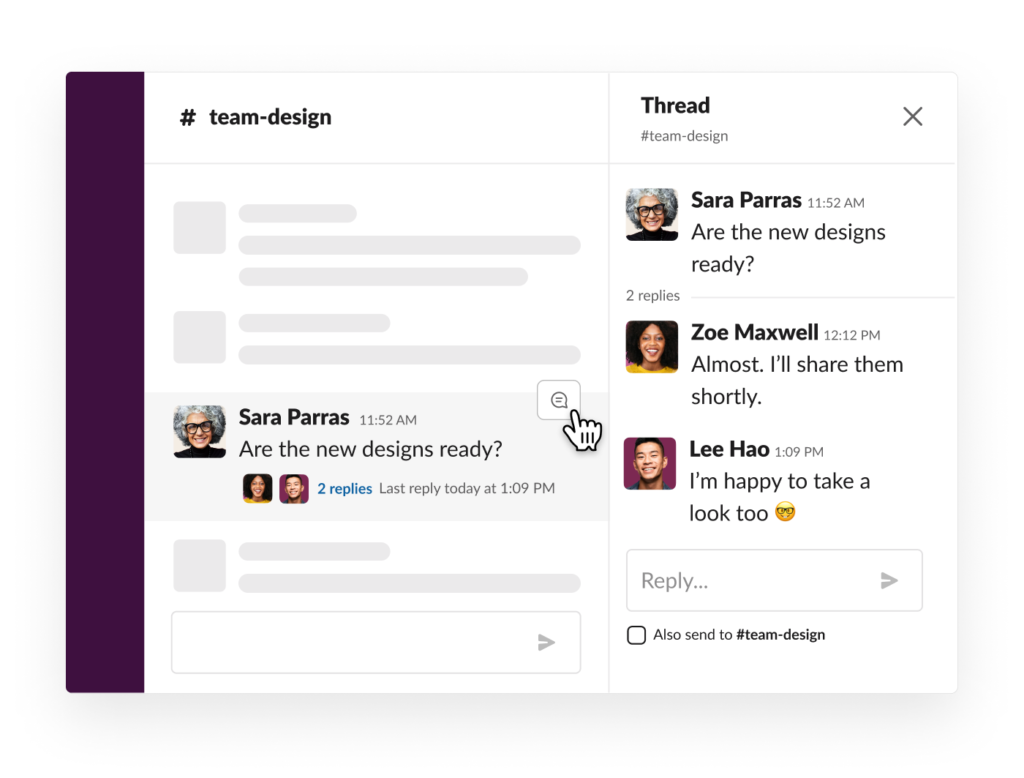
Messaging is where Slack built its reputation. Conversations are organised into public and private channels, with threaded replies, emoji reactions, rich formatting and searchable discussions.
Slack also offers canvases for shared documents and project information, lists for managing tasks and clips for short audio and video messages. These features make it useful for teams that rely on frequent conversations and quick collaboration.

Microsoft Teams also supports channels, group conversations, threaded discussions and direct messages. Its main advantage is its integration with Microsoft 365 applications.
Employees can collaborate on Word, Excel and PowerPoint files within Teams, while files are stored through SharePoint and OneDrive. Microsoft Loop components also allow teams to share and update content across supported Microsoft applications.

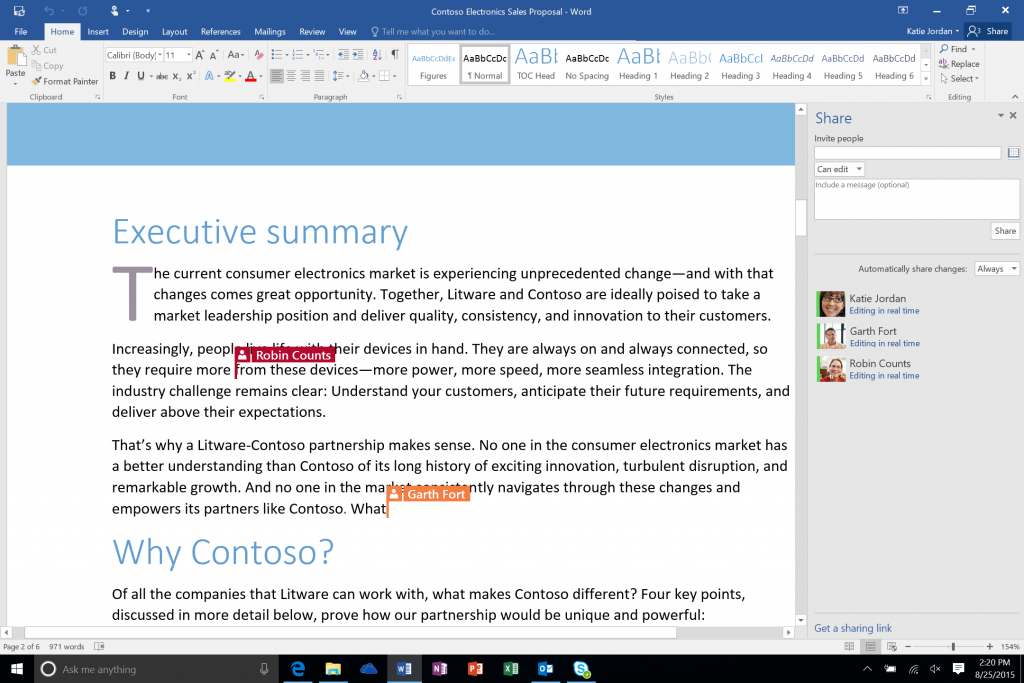
Winner, messaging: Slack for a dedicated chat experience and conversational workflows; Teams for organisations that frequently collaborate on Microsoft Office documents.
Video Meetings and Calling
Microsoft Teams has a stronger focus on formal meetings, video conferencing and business calling. Eligible business plans support meetings of up to 300 participants lasting up to 30 hours.
Teams includes features such as breakout rooms, meeting recordings, live captions and meeting collaboration tools. Certain subscriptions also support webinars, while larger organisations can use Teams Phone for enterprise telephony.


Microsoft offers Teams Premium as an additional licence for eligible customers. It provides enhanced meeting and event capabilities, although availability depends on the underlying subscription and licensing terms.
Slack takes a lighter approach with huddles, which are designed for quick, informal conversations inside channels and direct messages.

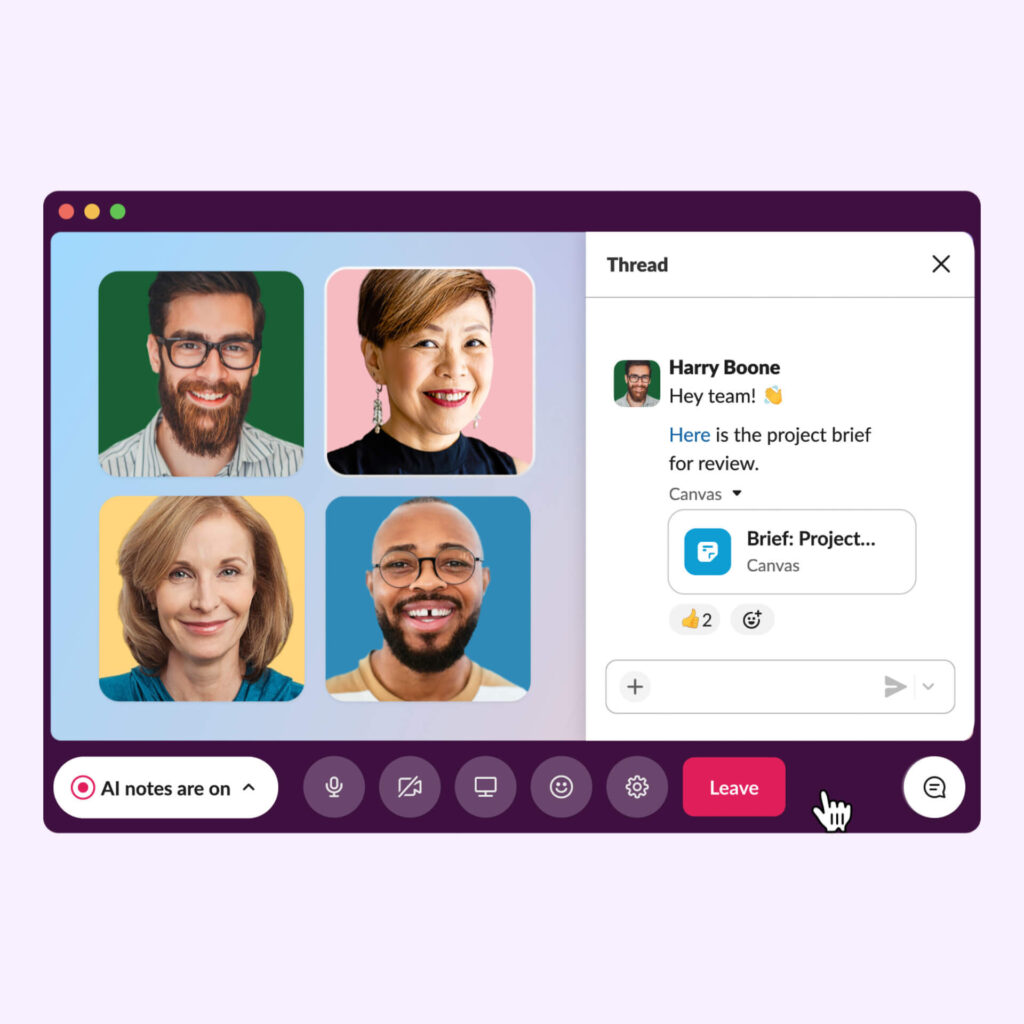
Paid Slack plans support huddles with up to 50 participants, although only 25 participants can enable video simultaneously. Free-plan huddles are limited to two participants.
Slack huddles also support screen sharing and collaborative discussion. Paid plans include AI-generated huddle notes, making it easier for participants to review important points after a conversation.
For large meetings, webinars and structured company-wide events, many Slack customers use a separate platform or Microsoft Teams.
Winner, meetings: Microsoft Teams, especially for organisations that regularly conduct large meetings, webinars and formal business calls.
AI Features: Slackbot vs Copilot
AI is becoming an important part of the competition between Slack and Microsoft Teams. Both companies are moving beyond basic chat assistance towards AI tools that can understand workplace context and help complete tasks.
Slack includes AI conversation summaries and huddle notes in its Pro plan. Business+ adds features such as AI search answers, personalised daily recaps, file summaries, translations and AI workflow generation.
Slackbot is Slack’s personal AI agent. It can use workspace context to help users find information, summarise discussions, draft content and carry out supported tasks. Business+ users receive 15 Slackbot messages per week, while Enterprise+ customers are not subject to the same weekly or lifetime message limits.
Microsoft’s AI strategy centres on Copilot and its expanding ecosystem of agents. Copilot Chat is available with eligible Microsoft 365 business subscriptions, but it should not be confused with the full Microsoft 365 Copilot licence.
Microsoft 365 Copilot provides deeper integration with applications such as Word, Excel, PowerPoint, Outlook and Teams. Its capabilities include work-grounded assistance, meeting summaries and AI-powered productivity features, subject to the relevant licence and feature availability.
For small and medium-sized businesses, Microsoft 365 Copilot Business is available as an additional licence. Its standard price is US$21 per user per month, with an eligible promotional price of US$18 through December 2026. Microsoft also offers bundled subscriptions, including Business Standard with Copilot at US$23.50 per user per month on annual billing.
Microsoft is also expanding its agent ecosystem, allowing organisations to use AI agents for tasks and workflows across its products.
Winner, AI: Slack offers useful AI features within its collaboration plans, while Microsoft provides deeper AI integration across productivity applications. The better option depends on whether your priority is conversational assistance or AI across Office and business workflows.
Integrations and Automation
Slack’s open ecosystem is one of its biggest strengths. Its Marketplace lists more than 2,600 apps, including Google Drive, Jira, GitHub, Zoom, Asana, Salesforce and Microsoft tools.
Slack’s Workflow Builder allows teams to automate routine processes without writing code. Business+ also includes AI workflow generation, helping users create workflows through natural-language instructions.
Microsoft Teams integrates closely with Outlook, SharePoint, OneDrive, Planner and Power BI. Organisations can also use Power Automate to build workflows that connect Microsoft applications and supported third-party services.
The Teams app ecosystem provides additional integrations, but its strongest capabilities are available when the rest of an organisation’s technology stack is built around Microsoft 365.
Winner, integrations: Slack for organisations using a mix of third-party applications; Teams for businesses already standardised on Microsoft’s ecosystem.
Working With Clients and Partners
Slack Connect allows organisations to collaborate with people outside their company through shared channels and direct messages. Paid plans support external collaboration with up to 250 organisations, making Slack useful for agencies, consultancies, technology companies and businesses that work closely with clients or vendors.
Microsoft Teams supports external access, guest access and shared channels. Shared channels allow employees to collaborate with people from other Microsoft 365 organisations without requiring them to switch between separate workspaces.
Teams works particularly well when external partners also use Microsoft 365. Slack can be more convenient when collaborating with partners who use different communication and productivity platforms.
Winner, external collaboration: Slack for mixed-platform partner ecosystems; Teams for organisations whose clients and partners also use Microsoft 365.
Security, Compliance and Administration
Both platforms offer enterprise-grade security and administrative controls, but their strengths are closely tied to their respective ecosystems.
Microsoft Teams benefits from Microsoft’s broader security and compliance infrastructure. Depending on the subscription, organisations can use Microsoft Entra ID, Microsoft Intune, Microsoft Defender and Microsoft Purview for identity management, device security, threat protection and compliance.
Microsoft 365 Business Premium is particularly relevant for smaller organisations that need stronger security and device-management capabilities alongside collaboration tools.
Slack offers security and administration features such as SAML-based single sign-on, user provisioning, data exports and enterprise-level administrative controls. Advanced capabilities, including enterprise key management, audit logs and data residency options, depend on the plan and configuration.
Both providers support recognised security and compliance standards. Organisations should compare the exact certifications, data-residency requirements, retention settings and compliance features included in the subscription they intend to purchase.
Winner, security and administration: Microsoft Teams for organisations already managing identity, devices and compliance through Microsoft 365. Slack remains a capable enterprise platform, particularly for businesses with a mixed software environment.
Slack vs Teams: Which Should You Choose?
The Bottom Line
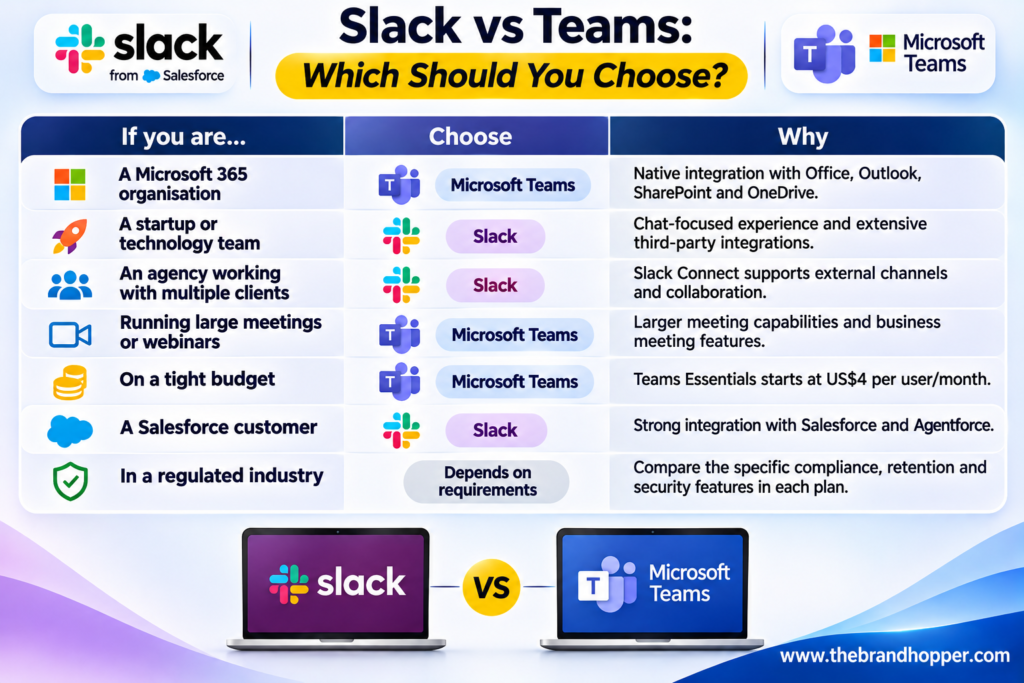
There is no universal winner in the Slack vs Microsoft Teams comparison. Microsoft Teams is often the better-value option for organisations that already use Microsoft 365, need business email and Office applications, or conduct frequent formal meetings.
Slack offers a strong messaging experience, an extensive app ecosystem and convenient external collaboration through Slack Connect. Its AI features also make it attractive to teams that want workplace assistance directly within their conversations.
Choose Microsoft Teams if your organisation depends on Microsoft’s productivity and security ecosystem. Choose Slack if your priority is flexible messaging, third-party integrations and collaboration with external partners across different platforms.
Frequently Asked Questions
Q: Is Slack or Microsoft Teams better?
A: Microsoft Teams is generally better for organisations using Microsoft 365, conducting large meetings and looking for an integrated productivity platform. Slack is better for chat-centric teams, startups and businesses that rely on multiple third-party applications or external partners.
Q: Is Microsoft Teams free?
A: Yes. Microsoft offers a free personal version of Teams that supports group meetings of up to 60 minutes and 100 participants, with 5 GB of cloud storage per user. For business use, Microsoft Teams Essentials starts at US$4 per user per month on annual billing.
Q: How much does Slack cost in 2026?
A: Slack Pro costs US$7.25 per active user per month with annual billing, or US$8.75 with monthly billing. Business+ costs US$15 per active user per month annually, or US$18 monthly. Enterprise+ pricing is available from Slack’s sales team.
Q: Who owns Slack?
A: Slack is owned by Salesforce, which completed its acquisition of the company in July 2021. The transaction had an announced enterprise value of approximately US$27.7 billion.
Q: Can Slack and Microsoft Teams work together?
A: Yes, to a degree. Slack integrates with Microsoft applications such as Outlook and OneDrive, while Microsoft has made commitments to improve interoperability with competing communication platforms in the European Economic Area.
However, Slack and Teams remain separate collaboration platforms. Organisations generally choose one as their primary internal messaging tool while using integrations to connect other applications.
Q: Which is better for video meetings, Slack or Teams?
A: Microsoft Teams is generally better for video meetings. Eligible business plans support meetings with up to 300 participants and durations of up to 30 hours, alongside features such as recordings, breakout rooms and webinars.
Slack huddles support up to 50 participants on paid plans, with a maximum of 25 participants using video simultaneously. They are designed primarily for quick, informal discussions.
Q: Does Slack have AI?
A: Yes. Slack Pro includes AI conversation summaries and huddle notes. Business+ adds features such as AI search, daily recaps, file summaries, translations and Slackbot, Slack’s personal AI agent.
Q: Can I buy Microsoft 365 without Teams?
A: Yes. Microsoft offers business subscriptions without Teams, including Microsoft 365 Business Basic without Teams at US$5.40 and Business Standard without Teams at US$10.79 per user per month on annual billing in the US.
Also Read: The Rise of Microsoft: A Success Story for the Ages
To read more content like this, explore The Brand Hopper
Subscribe to our newsletter
Go to the full page to view and submit the form.