


Choosing between Notion and Obsidian is like choosing between building with LEGOs or growing a Neural Network. Both are heavyweights in the “Second Brain” world, but they operate on completely different vibes.
Here is the breakdown of the great productivity showdown.
Notion: The “All-in-One” Digital HQ
The Vibe: A polished, colorful office where everything has a place.
Notion is built on Blocks. Every paragraph, image, or checkbox is a Lego brick you can drag and drop. It’s designed to solve “SaaS sprawl”—instead of having your notes in one app, tasks in another, and a wiki in a third, Notion puts them all in one pretty bucket.
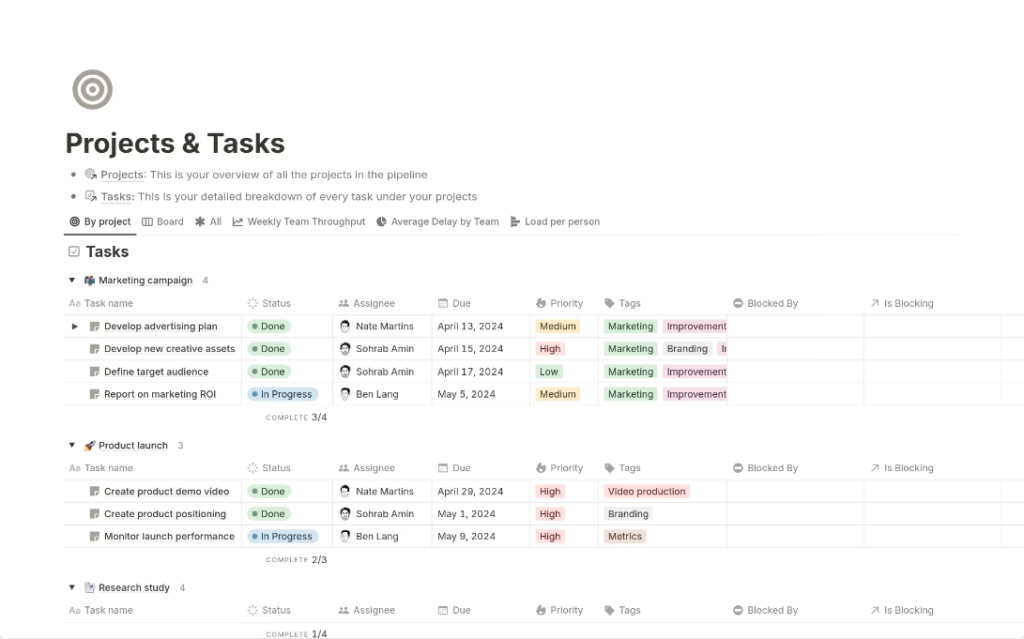
- The Killer Feature: Databases. You can turn a simple list into a Gallery, a Kanban board (like Trello), or a Calendar with one click.
- Best For: Teams, startups, and students who want a “Single Source of Truth.”
- The Catch: It lives in the Cloud. If the internet goes down, or if Notion’s servers have a bad day, your “brain” is temporarily offline.
Obsidian: The “Private Studio” for Your Mind
The Vibe: A minimalist, lightning-fast lab for deep thinkers.
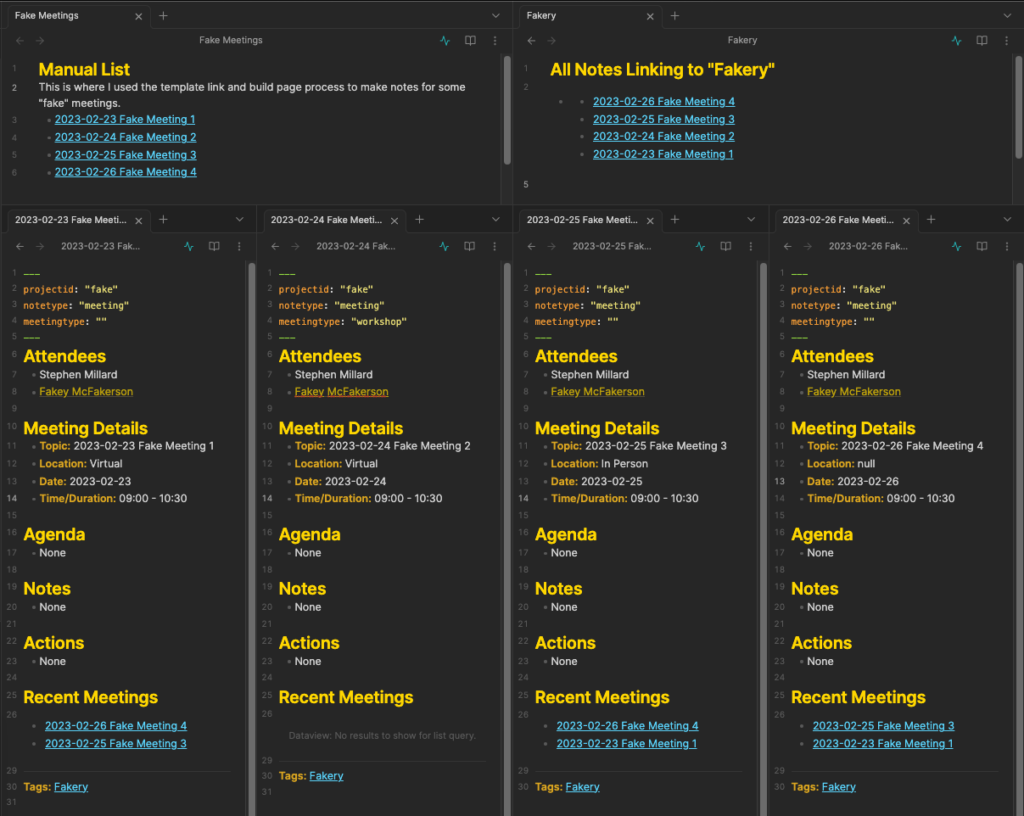
Obsidian is Local-first. Your notes aren’t on a corporate server; they are plain-text files on your own hard drive. It’s built on Links, not folders. It maps out how your ideas connect, creating a “Knowledge Graph” that looks like a galaxy of your thoughts.
- The Killer Feature: Bidirectional Linking. If you mention “Quantum Physics” in two different notes, Obsidian automatically maps that connection.
- Best For: Researchers, writers, and privacy buffs who want to own their data forever.
- The Catch: It’s a Learning Curve. You’ll need to learn a bit of “Markdown” (simple code like
**bold**) to make it look nice.
The Head-to-Head Comparison
| Feature | Notion 🏢 | Obsidian 🧪 |
| Storage | Cloud (Amazon Servers) | Local (Your Computer) |
| Philosophy | Top-down organization | Bottom-up discovery |
| Collaboration | God Tier. Real-time editing with teams. | Solo. Hard to sync with others. |
| Internet | Required (mostly) | Not needed |
| Format | Proprietary (Hard to leave) | Markdown (Open & Forever) |
The Great Philosophy Divide: How Do You Think?
Before we look at buttons and prices, we have to look at architecture. In the productivity world, your tool choice is a reflection of your cognitive style.
Notion: The “Top-Down” Architect
Notion is built on the concept of The Block. Imagine you have a bucket of digital LEGOs. One block is a paragraph. The next is a checklist. The next is an embedded YouTube video.
In Notion, you are a builder. You start with a blank page and decide: “I want a header here, a two-column layout there, and a database of my favorite pizza places at the bottom.” It’s a top-down approach. You create the structure first, then you fill it with info.
Obsidian: The “Bottom-Up” Gardener
Obsidian is built on the concept of The Link. It doesn’t care about “pages” in the traditional sense; it cares about Nodes.
In Obsidian, you are a gardener. You write a note about “Photosynthesis.” Inside that note, you link to “Sunlight” and “Carbon Dioxide.” You don’t have to decide where those notes “live” in a folder. Over time, these links create a web. It’s a bottom-up approach. Meaning emerges from the connections you make, mirroring how the human brain actually works.
A Brief History of the Productivity Wars (2013–2026)
To understand where we are in 2026, we have to look at how we got here.
-
2013: The Birth of Notion. Notion arrived to kill “SaaS Sprawl.” Back then, you used Evernote for notes, Trello for tasks, and Google Docs for writing. Notion said, “What if one app did it all?” By 2020, they were a $2 billion unicorn because they became the “Digital HQ” for the remote work revolution.
-
2020: The Obsidian Uprising. While Notion was getting famous, people started worrying about Data Privacy. They didn’t want their life’s work sitting on a corporate server they didn’t control. Obsidian launched as a “local-first” alternative. It focused on the Zettelkasten method—a fancy German word for a “slip-box” of interlinked notes.
-
2025–2026: The AI Integration. Today, we aren’t just writing notes; we’re co-authoring with AI. This is the current frontline of the war.
The Battle for Your Data: Cloud vs. Local
This is the “boring” technical part that actually matters the most for your long-term sanity.
Notion: The Cloud-First Kingdom
Notion is a “Software as a Service” (SaaS). Your data lives on Amazon Web Services (AWS) servers.
The Pro: Sync is magic. You type a word on your laptop, and it’s on your phone instantly. You can invite 50 people to a page and watch their cursors dance around in real-time.
The Con: You don’t own the “source code” of your life. If Notion goes bankrupt (unlikely, but possible) or has a massive server outage, you are locked out. While Notion added better offline support in 2025, it’s still fundamentally a web-based tool.
Obsidian: The Local-First Fortress
Obsidian lives on your hard drive. Your notes are .md (Markdown) files.
-
The Pro: Total Sovereignty. If Obsidian the company vanished tomorrow, your notes would still be there. You can open them with Notepad, TextEdit, or any other app. It’s “future-proof.” Plus, it’s insanely fast because it doesn’t have to wait for a server to load.
-
The Con: You are the IT department. If you want to sync your notes to your phone, you either pay for “Obsidian Sync” or set up your own Git/Dropbox/iCloud workaround. If you lose your laptop and don’t have a backup? Your brain is gone.
| Factor | Notion | Obsidian |
| Data Format | Proprietary JSON | Plain-text Markdown |
| Privacy | Corporate Managed | User Controlled |
| Speed | Dependent on Internet | Instant (Local) |
| Collaboration | Native & Seamless | Difficult/Workarounds |
Feature Showdown: Databases vs. The Graph
The Notion “Killer Feature”: Relational Databases
Notion’s database engine is arguably the most powerful tool in consumer software. It’s not just a spreadsheet; it’s a dynamic dashboard creator.
You can take one list of data and view it as:
1. A Table: For data entry.
2. A Kanban Board: To see your project pipeline.
3. A Timeline (Gantt Chart): To see if you’re hitting your deadlines.
4. A Gallery: To see visual inspiration.
In 2026, Notion released “Bases,” which allow these databases to talk to each other across different workspaces. It’s the ultimate “Command Center” for a business.

The Obsidian “Killer Feature”: The Knowledge Graph
Obsidian’s superpower is the Graph View.
When you link notes together using [[Note Name]], Obsidian maps it visually. As your “Second Brain” grows, you start to see clusters. Maybe your notes on “Biology” are starting to intersect with your notes on “Architecture.”
- Discovery: It helps you find “orphaned notes” (thoughts with no connections).
- Visual Thinking: It’s a bird’s-eye view of your entire intellectual life.

The AI Revolution: Agents vs. Plugins
It’s 2026. If your note-taking app doesn’t have an AI, it’s a typewriter.
Notion AI: The Autonomous Agent
Notion 3.0 introduced “Agent Mode.” This isn’t just a chatbot; it’s a worker.
- Contextual Memory: You can ask, “What did the client say about the budget in last Tuesday’s meeting?” and Notion AI will scan 500 pages of notes to give you the answer.
- Structure Building: You can tell it, “Build me a content calendar for my new YouTube channel,” and it will literally generate the databases, tags, and templates for you.
- Model Choice: In the 2026 update, you can choose which “brain” the AI uses—whether it’s GPT-5, Claude 4, or Gemini.
Obsidian AI: The Open Ecosystem
Obsidian’s AI is decentralized. Because the community is full of developers, there are over 100 different AI plugins.
- Privacy-First AI: You can run a Local LLM (using tools like Ollama). This means the AI processes your notes on your computer, and nothing is ever sent to a server. This is huge for researchers handling sensitive data.
- Custom Skills: Using “Obsidian Skills,” you can give an AI agent permission to read your graph and find connections you missed, all while keeping the data in your local vault.
User Experience: “Plug-and-Play” vs. “The Tinkerer’s Dream”
Notion: The Low Barrier
Notion is beautiful. It supports emojis, cover images, custom icons, and colorful callout boxes. It feels like a modern website. You can find thousands of templates online—if you want to be a “Productive YouTuber,” there’s a template for that. If you want to run a “Digital Garden,” there’s a template for that.
The Trap: “Template Fatigue.” It’s easy to spend 4 hours making your Notion look pretty and 0 minutes actually doing work.
Obsidian: The High Ceiling
Out of the box, Obsidian looks like a plain text editor from 1995. It’s black, white, and a bit scary.
But… it is infinitely customizable. Through CSS and community plugins, you can make Obsidian look like a futuristic spaceship console or a vintage typewriter.
The Learning Curve: You have to learn Markdown. You have to understand how “folders” vs “links” work. It’s a tool for people who like to “own” their workflow.
The Economics: Who Pays for What?
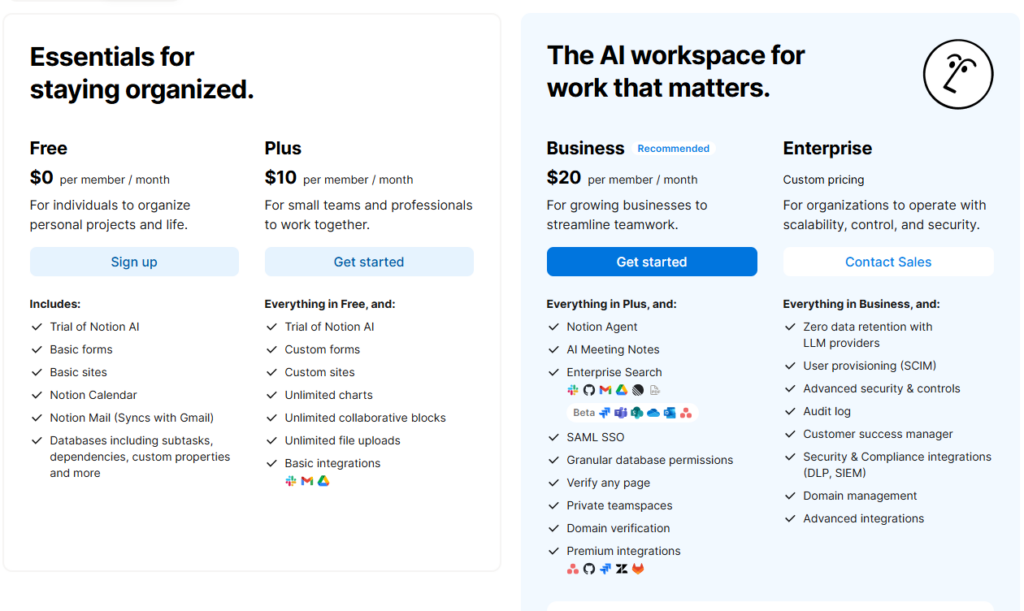
Notion’s Pricing (The SaaS Model)
- Free Plan: Great for individuals.
- Plus/Business ($10–$20/user): This is where they make their money. It’s aimed at teams who need unlimited file uploads and collaboration tools.
- AI Add-on ($10/month): Usually an extra fee to unlock the “Agent” features.

Obsidian’s Pricing (The Personal-First Model)
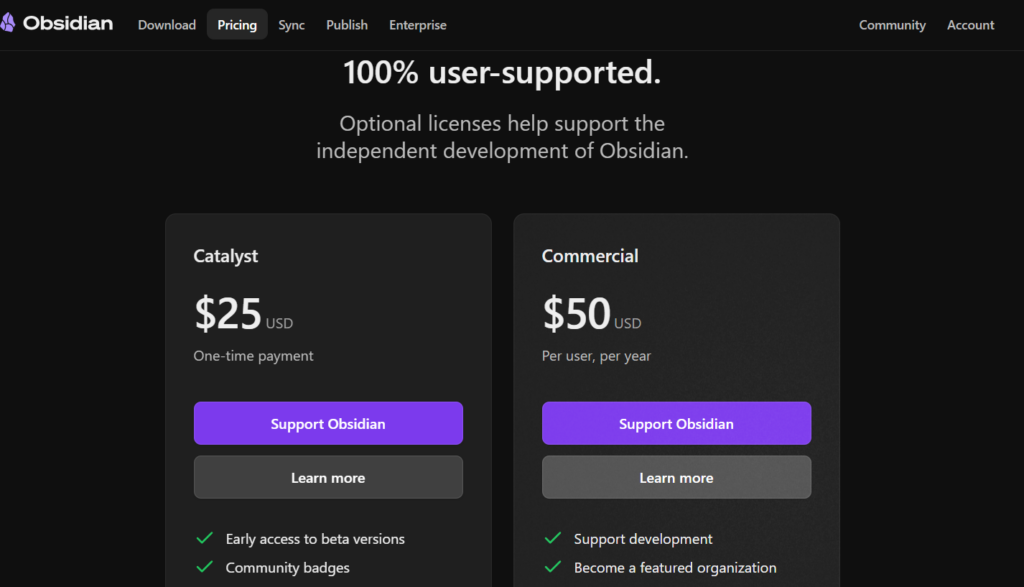
- Personal Use: 100% Free. No catch.
- Commercial License ($50/year): Only if you use it for work in a company with 2+ people.
- Add-ons: You pay for convenience. Obsidian Sync ($4/mo) and Obsidian Publish ($8/mo) are their primary revenue streams.

Use Case Analysis: Which One Is for You?
Scenario A: The Small Business / Marketing Agency
You have 5 employees. You need to track client projects, store brand assets, and have a shared calendar.
-
The Winner: Notion. * Why: Obsidian’s lack of real-time collaboration would be a nightmare here. Notion’s databases and “multiplayer” editing make it the perfect “Business OS.”
Scenario B: The PhD Student / Academic Researcher
You are writing a 300-page dissertation. You have 2,000 PDFs, hundreds of interlinked citations, and you need to see how “Ancient Greek Philosophy” connects to “Modern Ethics.”
-
The Winner: Obsidian. * Why: The Graph View and bidirectional linking are built for this. Plus, you’ll be working on this for 5+ years; you want that data in Markdown so it’s safe forever.
Scenario C: The “Solopreneur” Creator
You write a newsletter, manage a YouTube channel, and track your personal fitness.
-
The Winner: The Hybrid.
-
The Strategy: Use Obsidian for “Thinking” (drafting scripts, researching, journaling) and Notion for “Execution” (tracking the publication schedule, managing sponsorships, and building a public-facing website).
Final Verdict: 2026 and Beyond
As we move deeper into 2026, the gap is closing. Notion is adding better offline tools. Obsidian is adding better database-like views (via the .base format).
But the fundamental choice remains: Do you want a tool that manages your work (Notion), or a tool that helps you think (Obsidian)?
- Choose Notion if you love structure, aesthetics, and working with others. It’s a digital skyscraper.
- Choose Obsidian if you love privacy, speed, and the feeling of building a lifelong library of wisdom. It’s a digital forest.
Also Read: Spotify vs Apple Music: Which Is Better?
To read more content like this, subscribe to our newsletter
Go to the full page to view and submit the form.