AI that turns text into pictures? Yes, it’s a thing! It’s a super fun, practical tool that anyone can use. You just chuck in an idea and like magic, it pops out a picture that captures your thought. It’s not just fun, it’s practical too.Whether for a personal project or for professional work, AI image makers have got you covered. Need a fun invite for a party or a card for your grandma? You got it! Or perhaps you need some cool graphics for your company’s social media posts or promotional material. No problem. There are heaps of these AI picture-makers out there, each having its own unique feature. So it can be tough to figure out which one will best suit your needs. That’s why we’ve done the hard part for you. We’ve checked out a range of these AI tools and have put together a list to help you choose the right one for you. Check out our findings below.
Cabina.AI
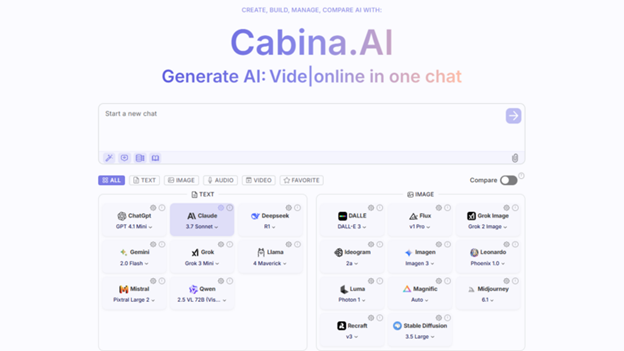
If you need a one-stop-shop for creating images with artificial intelligence, look no further than Cabina.AI. It brings together a lot of high-end AI image models all in one place. Instead of setting up multiple accounts on various platforms, Cabina.AI allows you to access famous image makers like Dalle, Flux, GPT image, Grok Image, Icon Gen, Ideogram AI art generator, Imagen, Leonardo, Luma, Magnific, Mijourney, Recraft, RunWay, Stable Diffusion right from one single space. You won’t have to juggle multiple subscriptions or swap between different interfaces anymore, making your image creation process easier.
Cabina.AI also lets you check out results from different models, helping you find the best fit for your needs. And there’s even a powerful AI In-paint editor built right in for complex image adjustments. You can tweak pictures, get rid of things you don’t want in them, grow canvases, switch up styles, and turn sketches into detailed drawings just by typing out what you want.
Key Features:
- LoRA custom model creation for constant product/character production
- Seamless blending with text, audio, and video AI tools
- Prompt generator and enhancer just for creating images
- Mode for multiple formats allowing text-to-image-to-video workflows
- Options for commercial use available
- An organized system of folders for handling created images
- Arrival at 14+ prime AI image generators in one platform like DALLE, Flux, GPT-4o, Grok, Ideogram, etc.
- Comparison of different AI image models side-by-side
- An advanced AI In-paint editor with several editing functions
- Image-to-image creation abilities across multiple models
- Tools for transforming sketches to images
- Generator for different creative versions of images
- Tools for removing objects and backgrounds
- Image upscaling features
FLUX.1

Black Forest Labs achieved a notable advancement in AI image generation with FLUX.1, developed by a team of former Stable Diffusion contributors. After experiencing challenges at Stability.ai, they formed a new group with the aim of creating an improved alternative, which many believe they have accomplished. FLUX.1 surpasses standard Stable Diffusion models, producing more detailed and comprehensive images.
This tool quickly gained popularity within the AI art community and was integrated into numerous platforms. Many consider FLUX.1 a significant improvement over simpler text-to-image tools in the realm of AI picture creation. It is available in two versions: FLUX.1 Schnell, which is accessible to all under the Apache 2.0 license, and the larger FLUX.1 model, which is open-source for non-commercial applications only.
Key Features:
- Growing community support and adoption
- Accessibility across various online platforms
- Complimentary trial credits on multiple services
- Adaptability to existing Stable Diffusion processes
- Regular updates and improvements
- Diverse options for both business and personal applications
- Created by the original developers of Stable Diffusion
- Enhanced image quality compared to standard Stable Diffusion models
- Open-source licensing options (Apache 2.0 for the Schnell version)
Stable Diffusion

Stable Diffusion has made a name for itself in the unique systems category, primarily because of its open-source nature. This means it’s freely available, easily reachable on various platforms. Tech enthusiasts with an understanding of the software can download the right package for their machines and modify the tool to fit their specific requirements. Therefore, it’s quite popular among various AI image solutions. Tasks like portrait creation or sketching building visuals make use of this tool extensively. The results achieved are of high quality, and moreover, the customization options for learners are unrivaled.
Key Features:
- Active support available from user community, and sufficient resources.
- Compatible with multiple user interfaces.
- Free of cost options through many services.
- Full control in the hands of tech-advanced users.
- Open-source license offers great opportunities for customization.
- Capability of being run locally on personal computers.
- Multiple alternative versions for specific use cases.
- Large-scale accessibility across diverse platforms.
Midjourney

Midjourney is well-known for creating some of the top artificial intelligence-generated images out there. They’ve recently improved their services by introducing a simpler web application to replace the old one that was only accessible through Discord. The Midjourney community presents several beneficial features – you have the chance to draw inspiration from other members’ designs and learn more about the capacities of the platform. They offer comprehensive, user-friendly tutorials that will guide you through everything. This ranges from generating basic pictures to discovering how to select and fine-tune your models. Currently, they’re not offering a free trial due to high demand. However, their subscription plans are definitely worth the cost. Their basic plan is roughly $10 each month, providing you with approximately 3.3 hours of GPU time. This is enough to produce about 200 images. If you require additional time to produce images, you’re allowed to refill it at your convenience.
Key features:
- Accommodation of commercial licenses with paid options
- Variety of model version options
- Image enhancement features
- Character references
- Tools for personalizing your work
- Exceptional image quality completed with realistic textures and colors
- User-friendly web application paired with a Discord link
- Comprehensive help guides
- A community page for generating creative ideas
Ideogram
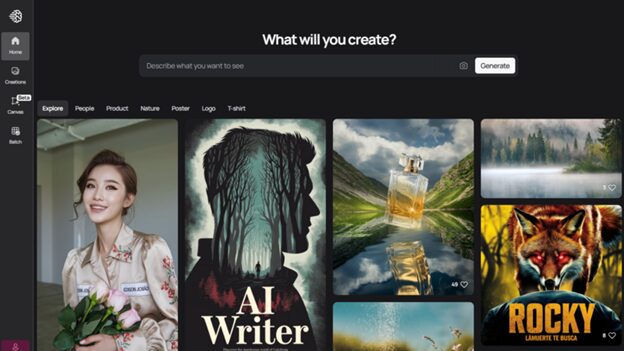
Ideogram is leading the pack in the tough task of getting text right in AI image creation. The latest update – version 3.0, does a great job at producing top-quality images with sharp, readable text. It’s perfect for mock-ups, posters, and any type of design that needs text. Of course, it doesn’t stop at just doing text right. The image quality offered by Ideogram is top of the line, standing shoulder-to-shoulder with brands like Midjourney. Plus, its web interface is a breeze to use and offers neat tools for editing images and drawing inspiration from existing ones. There’s also a new feature called the Batch Generator – really useful for creating a bunch of designs in no time. Just upload a spreadsheet with your suggestions and just like magic, you have bulk creations in an instant.
Key Features:
- Trial run canvas function for complicated designs
- A free plan that comes with a set number of credits
- Provisions for business use
- High-quality image production close to Midjourney
- A web interface that’s easy on the eyes and easy to use
- Built-in tools to edit images
- Useful features for using reference images
- Bulk production using spreadsheets
Wrapping It Up
The ability to make pictures using AI has significantly advanced. In the modern world, we can find various tools for everyone’s skills and needs. When you’re picking your AI tool to make images, it’s super important to think about what you really care about. Do you care most about the image’s quality, the perfection in text, the options for customization, the ease of use, or the potential to connect with other software? While these top six options are great in different ways, they’re all leading the charge in AI for creating images.
Thanks to the fast-paced growth of technology, these tools are becoming easier for everyone to get their hands on. Whether you’re a pro designer or just starting to explore the image design realm, these tools provide the power for everyone to create visuals in ways that would have seemed unthinkable a few years ago.
To read more content like this, explore The Brand Hopper
Subscribe to our newsletter