Video production was once a rite of passage for all marketers: rent equipment, hire staff, shoot the script, and hope for good lighting. No more. With an intelligent automation-powered world, video creation has transitioned from a labor-intensive shoot to a quick share-and-generate exercise. One of the most significant changes? Pippit’s AI video generator, it can be just a product link, and in minutes, you have a shiny, platform-ready video.
Forget about camera angles, re-recording intros, and days spent in Premiere Pro. This is the no-camera revolution, one link at a time.
What is an AI video generator — and why should you care?
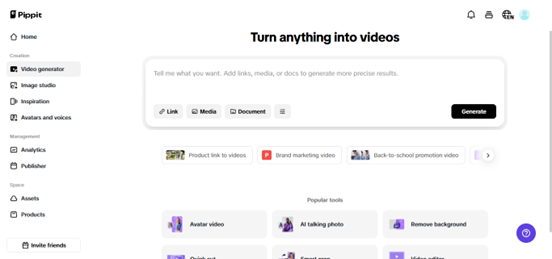
An AI video creator is not simply another video editing app. It’s a content manufacturing engine that produces branded, story-driven, visually compelling videos from a URL. Add it to a product page, and the platform extracts images, text, and specifications. Then it matches them with avatars, voiceovers, and popular formats specific to your audience.
For lean marketers who don’t have time to orchestrate fancy shoots, or for brands attempting to meet the day-to-day content requirements, this is gold. And if you are working on platforms like TikTok, Instagram Reels, or Facebook Ads, this technique may well provide the upper hand you’re lacking.
The secret sauce: URL to video
What makes this strategy so outrageously effective is the URL to video workflow. Rather than creating assets from scratch, the tool automatically generates graphics based on existing product pages. From extracting SEO-friendly descriptions to inserting visuals with audio to creating short-form video hooks.
Let’s imagine this:
- You’ve released a new skin serum.
- You don’t have enough time for a special shoot.
- You insert your product link into Pippit.
In few seconds, you’ve got a punchy 30-second TikTok-style video with an avatar voiceover, product images, and scroll-stopping animation.
Sounds like a cheat code? It is.
How Pippit does it
Let’s break down how to make this magic happen with Pippit
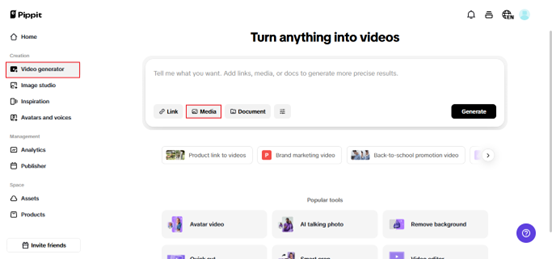
Step 1: access the video generator tool
Log in to your Pippit account and go to the Video Generator page. Paste the URL of your product into the box provided. Pippit will instantly pull product descriptions, prices, and images available on the page. You can replace images, change the product name, or add your own visuals. If you don’t have a link, simply upload the media by hand
Step 2: customize video settings
Then refine your content. Select your preferred video length (15-60 seconds), select an aspect ratio (square for Facebook, vertical for TikTok), and let Pippit automatically generate scripts around the latest social media trends in real-time. Need more control? Write your own script. Next, select an AI avatar to say the lines — or let Smart Match select a voice/avatar pairing that matches your product’s feel.
Step 3: edit, export & publish
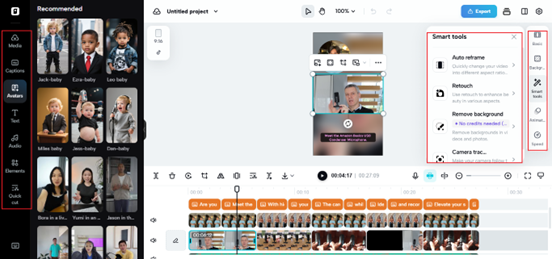
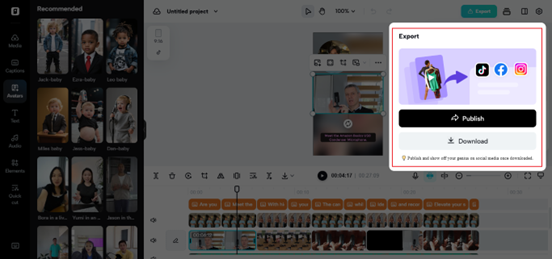
After your video has been created, go into the editor. Trim, alter scenes, or add additional footage by dragging and dropping. You can add text overlay, add background music, and automatically create captions. Once you’re prepared, click export. You can export directly to TikTok, Facebook, or Instagram. Shopify customers can connect to their store and add shoppable links.
This entire process, from link to life, is completed in under 15 minutes.
Why marketers are dropping traditional shoots
Time and Cost Savings – Traditional shoots are time-consuming and expensive, running into thousands and weeks of planning. With this new technique, content creation is a one-man show.
Uniform Branding – AI-rendered videos guarantee consistency across your product range. Each video employs the same font, tone, voice, and design.
Speed and Agility – Need to refresh your ad with a fresh price or feature? You don’t retake, you regenerate.
Accessible to Everyone – No camera? No worries. Anyone with a laptop and a link can produce high-converting content. This is a huge game-changer for microbrands and creators coming into the market with no capital.
Who’s using it — and how it’s working
Product collab creators: Influencers can produce product promos for limited-time drops without booking a studio shoot.
Multiclient agency teams: Branded content for 20+ clients is possible with just one input: the product URL.
Shopify store owners: They don’t need to hire freelancers; they just add their product link to Pippit and get TikTok-friendly shoppable videos in seconds.
Freelancers and virtual assistants: Virtual teams utilize this application to assist brands in expanding their presence without the requirement of design proficiency.
A real example: old link, new life
A small home goods company had an idle product page for decorative candles. They had never promoted it in over a year. From the URL, they built a warm, narrated 30-second video with lifestyle stock footage and an AI avatar detailing the scent profile. They shared it as a Reel, and within 48 hours, it racked up 3x the views of their previous campaign.
The twist? They didn’t shoot anything.
Why is this more relevant than ever
The content economy is saturated, and users don’t forgive. If your video takes too long to make, it’s already old news by the time you publish it. That’s where Pippit and its zero-production process come in.
Rather than asking, “What can we film this week?” you ask, “What link should we share next?” This transition liberates marketers to concentrate on what actually matters: story, tone, and timing.
Link in, content out — it’s that simple
In a world where speed and volume matter greater than perfection, Pippit helps brands to work smart, not difficult. Whether you’re a individual creator launching your first ad or a growing e-commerce brand aiming to scale with agility, this is the simple way that keeps your feed fresh.
Ready to transform your link into a viral video? Head to Pippit and create in minutes.
To read more content like this, explore The Brand Hopper
Subscribe to our newsletter