Main Takeaways
- Short AI is a powerful tool designed to simplify tasks and enhance productivity.
- Key features include user-friendly design, advanced natural language processing, and customizable settings.
- While Short AI offers numerous advantages such as increased efficiency, there are some drawbacks like dependency on technology.
- Understanding the pricing structure is essential for users to determine if Short AI fits within their budget.
- Short AI can benefit a wide range of users, including students, professionals, and businesses looking to streamline their operations.
- Using Short AI is straightforward, with clear tutorials available to guide new users through the setup and features.
- In conclusion, Short AI is an innovative solution that can transform how individuals and organizations manage their time and tasks.
What is Short AI?
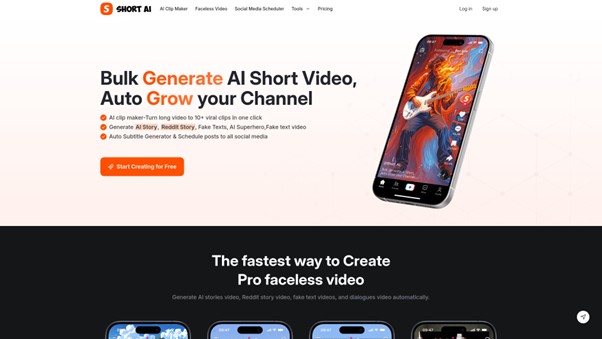
Short AI is a powerful online platform that leverages artificial intelligence to help you create eye-catching short videos quickly and effortlessly. At its core, Short AI features an advanced AI Video Clip Generator that simplifies the entire process—whether you’re making content for TikTok, YouTube Shorts, or Instagram Reels—even if you’ve never edited a video before. This intelligent tool handles everything from breaking long videos into multiple viral-ready clips, to adding dynamic subtitles, and even scheduling your content for posting.
With Short AI, you can create a variety of video types, including faceless content, story-driven videos, meme-style clips, superhero edits, and much more. The platform comes equipped with ready-made templates, supports more than 32 languages, and includes powerful tools designed to boost viewer engagement and accelerate your follower growth. Best of all, you can manage and schedule all your social media posts from one centralized dashboard.
If you’re ready to explore pricing or want to start creating right away, visit the official Short AI website to learn more and sign up for an account.
Features of Short AI
Short AI stands out as a top choice for content creators who want to make professional short videos quickly and easily. No matter if you’re new to making videos or already have experience, Short AI’s features are designed to help you save time and get the most out of your creativity.
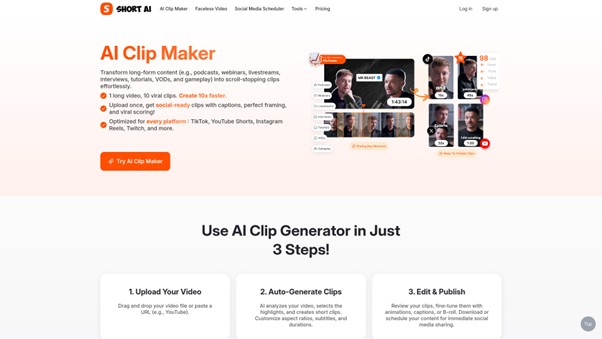
The AI Clip Maker allows you to instantly transform any long-form video into multiple short, viral-ready clips with just one click. It intelligently identifies the most engaging moments, such as key highlights and emotional reactions, ensuring your content is perfect for sharing. You can create impressive videos without ever appearing on camera using the Faceless Video Creation feature, which keeps your identity private while helping you reach a broad audience. The AI Story Video Script Generator makes it easy to turn your ideas or stories into compelling video scripts by offering a wide range of creative templates, including animals, memes, superheroes, and more. With Quick Subtitles and Captions, you can generate accurate subtitles in over 32 languages with more than 99% precision, enhancing viewer engagement through creative styles, emojis, GIFs, and text highlights that make your captions stand out. To save time, you can plan and schedule your videos to publish across TikTok, YouTube, Instagram, and other platforms from a centralized dashboard. The platform also provides over 50 ready-to-use viral script templates inspired by trending hashtags and popular content styles to jumpstart your creativity. Editing and exporting your videos is quick and straightforward, with most videos ready to share in just one to two minutes, and you also have the option to schedule them for automatic posting. Supporting more than 32 languages in both audio and subtitle formats, the platform enables you to effortlessly reach global audiences.
With all of these powerful features, Short AI helps you create engaging, high-quality short videos that can easily go viral on TikTok, YouTube, and more. Whether you want to try the AI Clip Maker, build a faceless video channel, or write a story script, Short AI puts all the best tools in your hands.
Pros and Cons of Short AI
Choosing the right tool for creating short videos is important. Here, we will look at the positives and possible downsides of using Short AI to make your videos stand out. Understanding these can help you decide if this tool is right for your needs.
- Strong AI video clip generator—create many viral short clips from a long video in just one click.
- Supports a wide range of templates: story videos, Reddit stories, fake text videos, dialogue videos, memes, superhero clips, and more.
- Automatic caption and subtitle generation in over 32 languages, boosting accessibility and engagement.
- User-friendly interface: even beginners can easily use the AI Clip Maker and other features.
- Allows scheduling posts across multiple social media platforms, saving lots of time.
- Ready-to-use script generator gives quick, editable templates inspired by viral trends.
- Helps users grow followers, boost engagement, and increase earnings with minimal effort.
- No need to show your face—perfect for faceless video creators.
- The tool focuses mainly on short video creation—might not fit creators looking for long-form content editing.
- Though many templates and options are offered, customization is limited to preset selections.
- Some advanced features under development may not be available right away.
- Video and audio previews sometimes may not be supported on all devices, requiring refresh or replay.
By weighing the advantages and limitations above, you can better decide if Short AI meets your channel or creative goals. For details on pricing options, check the Short AI pricing page.
Pricing of Short AI
When you’re choosing the right AI Video Clip Generator or AI Clip Maker for your projects, it’s important to know about the pricing and plans. Short AI offers different plans to suit everyone’s needs, from beginners to professional creators. Let’s take a detailed look at what each plan gives you.
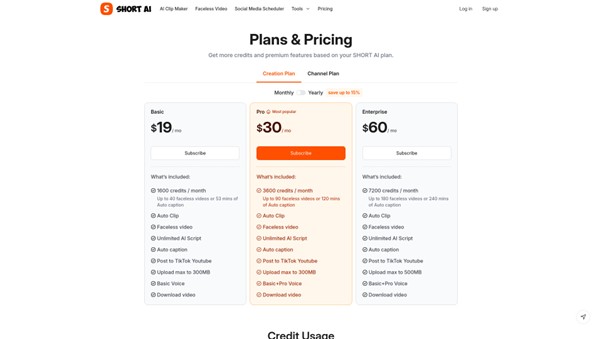
Short AI offers three main subscription plans: Basic, Pro, and Enterprise. Each plan is billed yearly, which helps you save up to 15%. The plans vary by the number of monthly credits, the number of faceless videos you can generate, and the length of auto captions you can use.
- Basic Plan: Costs $19 per month (billed yearly). Includes 1600 credits, which covers up to 40 faceless videos or 53 minutes of auto caption per month. You get essential features like the Auto Clip, Faceless Video creation, unlimited AI script generation, automatic captioning, and posting to TikTok and YouTube. The upload size limit is 300MB, and you have access to Basic Voice options.
- Pro Plan: The most popular plan at $30 per month (billed yearly). This plan gives you 3600 credits monthly, supporting up to 90 faceless videos or 120 minutes of auto captions. It upgrades your voice options to include Basic and Pro Voice and has the same upload limit of 300MB.
- Enterprise Plan: Costs $60 per month (billed yearly). Perfect for teams or creators who need more content, with 7200 credits each month. You can make up to 180 faceless videos or use 240 minutes of auto captions. The upload limit increases to 500MB and all voice options are available.
Credits are used depending on the type of video or tool you use. For example, each faceless video or superhero video uses 20 credits, an AI story video (per 30 seconds) also takes 20 credits, auto captions use 30 credits per minute, and auto clips need 20 credits per minute. This helps you plan how to best use your monthly credits.
Short AI’s pricing is simple, and you only pay for what you need. No matter if you’re just starting out or are already a top content creator, you can find the right plan for your content journey. Plus, with yearly billing, you get to save more over time!
If you want to see the full details and choose the plan that fits you best, visit the Short AI pricing page.
Who Can Benefit from Short AI?
Short AI is designed to help many different types of people and groups. If you love making videos, want to grow your social media accounts, or need quick and easy content creation, Short AI can be a game-changer for you. With AI-powered features, it makes video editing simple and helps you get more attention online.
Whether you are a regular person who enjoys sharing moments on TikTok or YouTube, a teacher turning lessons into fun clips, or a small business wanting to promote your products, Short AI is built to boost your results. It doesn’t matter if you are just starting out or have been creating videos for a while—Short AI offers powerful tools for everyone.
- Anyone who wants to create short, viral videos for TikTok, YouTube, or Instagram
- People who prefer faceless videos and want to keep their identity private
- Beginner creators looking for easy, automated video editing and quick results
- Busy individuals or teams who need to schedule and manage content posts on multiple platforms
- Content creators who want to increase engagement with subtitles, effects, and music
- Teachers and educators turning educational content into bite-sized, interesting clips
- Businesses aiming to promote their brand or products across different social channels
Real creators are already seeing great results with Short AI. Some doubled their followers, while others saved hours on editing each week. No matter your goal—gaining followers, earning money, or making stunning videos quickly—Short AI is the smart choice to help you succeed.
How to Use Short AI
Getting started with Short AI is very easy. Whether you want to make viral clips from a long video or create cool fake text conversation videos, you can follow some simple steps to let the AI do all the hard work for you. Here we’ll show you how to use Short AI to create awesome short videos fast. This guide is perfect for beginners and creators who want to save time and get fantastic results.
- Go to the Short AI website and log in or sign up for free.
- If you want to turn a long video into many short viral clips, click on the ‘Auto Clip’ tool.
- Upload your long video file or paste the link, and let Short AI cut the best moments into short videos. This process only takes about 1–2 minutes.
- To create a fake text conversation video, choose the ‘Fake Text Video Script’ option. Here, you can write your own chat or use presets to make your video fun and unique.
- After your videos are ready, you can edit the captions, add emojis or GIFs, and customize the look to match your style.
- Download your finished video to your computer, or schedule it to post directly on TikTok, YouTube, or other social media platforms using Short AI’s scheduler.
With Short AI, you don’t have to worry about difficult editing or spending lots of hours making videos. In just a few clicks, your videos are ready to share. The platform even supports over 32 languages and different video formats, so everyone can create content that’s just right for them. Try experimenting with both the Auto Clip tool and the Fake Text Video Script option. You’ll quickly see why so many creators love using Short AI to grow their channels and have fun making content!
Conclusion
In summary, Short AI proves to be an outstanding tool for anyone looking to quickly make eye-catching short videos with the help of artificial intelligence. Thanks to the free AI Video Clip Generator and AI Clip Maker features, users can turn ideas into viral video content for platforms like TikTok, YouTube Shorts, and Instagram Reels. With one-click options for generating faceless videos, adding subtitles, editing with professional effects, and even scheduling social media posts, Short AI saves a huge amount of time and effort. Whether you’re a beginner or a seasoned creator, it’s simple to use and delivers impressive results. If you want to grow your channel, boost video engagement, or even start earning money from your content, Short AI is the ultimate, easy-to-use solution.
To read more content like this, explore The Brand Hopper
Subscribe to our newsletter