Key Takeaways
- Inker AI is a powerful tool designed to enhance your writing experience.
- It features various options to improve creativity and productivity through AI-assisted writing.
- Users can easily navigate Inker.AI to create compelling content quickly.
- Like any tool, Inker.AI has its pros and cons, making it important to weigh them before use.
- To get started with Inker.AI, follow the straightforward tutorial provided for new users.
- Overall, Inker.AI can be a great asset for writers looking for assistance in their craft.
What is Inker.AI?
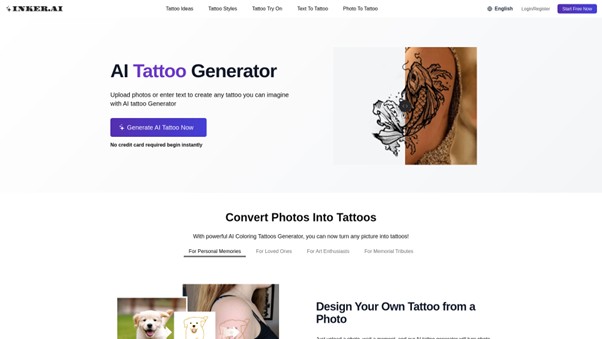
Inker AI is an online platform made for anyone who wants to create or explore tattoo designs easily. This unique website uses advanced AI technology to help people turn their ideas or photos into amazing tattoo visuals, even if they have no drawing experience. Whether you want to design something new or just see how a tattoo might look, Inker.AI gives you a simple, fun way to do it.
With Inker.AI, users can try out a wide range of tattoo styles and ideas. You can use words or upload photos, and the AI will quickly create tattoo designs based on your input. This means you can see your dream tattoo before ever picking up a needle. The site also offers a handy Tattoo simulator (tattoo try-on tool), letting you see how a tattoo would appear on your skin.
Because Inker.AI is available on both mobile devices and regular web browsers, you can get inspired and make new tattoo art anytime and anywhere. You don’t need to pay or enter any credit card details to start using many of the features, so it’s easy for everyone to join and have fun exploring tattoo possibilities.
Text To Tattoo lets you turn simple ideas or words into tattoos. Meanwhile, Photo To Tattoo allows you to upload a favorite image—maybe a pet, a loved one, or special memory—and have it transformed into unique tattoo art in seconds.
Features of Inker.AI
Inker.AI is packed with amazing features that make creating and trying tattoos fun and easy for everyone. No matter if you are just curious, trying something new, or you are a tattoo fan, you’ll find helpful options to help explore new ideas and visualize your dream ink. One of the coolest things about Inker.AI is its powerful tattoo simulator, letting you see what a tattoo might look like on you before you make a final decision. Besides that, you can turn your own text or photos into unique tattoo designs—all with just a few clicks.
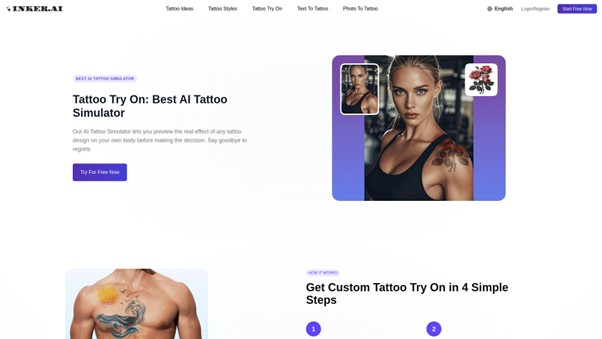
- Tattoo Try-On: The tattoo simulator lets you try different tattoos on a photo to see how they’d look in real life.
- Text to Tattoo: Turn your written ideas or dreams into tattoo images using smart AI tools.
- Photo to Tattoo: Upload a photo and change it into a custom tattoo design, perfect for personal memories or tribute tattoos.
- Explore Tattoo Styles: Browse popular tattoo styles, like tribal, realism, watercolor, and minimalist.
- Free Download: Download tattoo designs in high-quality PDF or PNG to show your tattoo artist or even print out temporary tattoos.
- Mobile and PC Friendly: Inker.AI works smoothly whether you’re using a computer or a phone.
These features are designed to help you get creative, try out lots of ideas, and find a tattoo style that fits you. Plus, whether you have drawing skills or not, the platform is simple to use. You never have to worry about messing up—the AI handles the art part for you. For anyone searching for tattoo inspiration or wanting to see how a tattoo might look in real life, the tattoo simulator and other Inker.AI tools are the perfect helpers.
Pros and Cons
When choosing an online tattoo simulator like Inker.AI, it’s important to consider both the advantages and possible disadvantages. Here, we break down the main pros and cons, so you can decide if this tattoo simulator is the right fit for your needs.
Pros:
- Easy to use, even if you don’t have any drawing skills. Just upload a photo or type your idea and the AI does the rest.
- Available on both PC and mobile, so you can access the tattoo simulator anywhere.
- Get free tattoo designs each month as a new user, making it possible to explore ideas at no cost.
- High-quality downloads in PDF and PNG formats, perfect for sharing with tattoo artists or using as temporary tattoos.
- Privacy features ensure your tattoo ideas remain just for you when privacy mode is enabled.
- Works for a wide range of users: tattoo lovers, artists, people looking for inspiration, and even those wanting to turn photos into tattoo art.
Cons:
- Free access is limited by a monthly quota for new users—after that, you’ll need to check the pricing page for any charges.
- While designs are customizable, super detailed or unique requests might need extra adjustments by a real tattoo artist.
- You have to register for an account to unlock all features and privacy settings.
Overall, the tattoo simulator from Inker.AI brings both benefits and a few trade-offs to keep in mind. If you want an easy-to-use, creative platform to visualize tattoos, but don’t want to invest too much upfront or want full privacy, it’s a smart choice. As always, read the terms for details on using the platform.
How to Use Inker.AI?
Getting started with Inker.AI is quick and easy. Whether you want to generate a tattoo from text, upload a photo, or try on a tattoo virtually, Inker.AI makes the process simple. Follow these steps to bring your unique tattoo ideas to life and explore endless possibilities with this powerful tattoo simulator.
- Go to the Inker.AI website and log into your account. If you don’t have an account, you can register for free.
- To create a tattoo from your own words, select the Text To Tattoo option. Type in your idea, and the AI will generate a unique tattoo design based on your description.
- If you want to turn a personal photo into a tattoo, choose Photo To Tattoo. Upload your image, and in a few moments, the AI will transform it into a tattoo style you can view and download.
- To see how a tattoo would look on your body before getting inked, use the Tattoo Try-On feature. This tattoo simulator lets you virtually place tattoos on your photo, so you can make sure it matches your vision.
- Browse and download free tattoo designs from various styles if you’re looking for inspiration or ready-made art.
- Once happy with your design, download it and bring the printout to your tattoo artist or use it for a temporary tattoo. Designs are provided in high-quality formats suitable for printing.
With Inker.AI, everyone—including people with no drawing skills—can easily convert ideas and images into creative, professional-looking tattoos. The site is designed to be user-friendly so that anyone can explore different tattoo styles, try them on, and discover the perfect design.
Ready to try Inker.AI and create your dream tattoo with the tattoo simulator? Head to the website and start now. With no credit card required, it’s totally beginner-friendly and safe to use. Explore your creativity and see how fun getting a new tattoo idea can be!
Conclusion
After exploring all the amazing features of the tattoo simulator at Inker.AI, it’s easy to see how this platform stands out for anyone interested in tattoos. Whether you want to try on a tattoo virtually, turn ideas into art with the AI tattoo generator, or simply find inspiration from a wide variety of tattoo styles and ideas, Inker.AI makes the process simple, fun, and accessible. No drawing skills are needed, and the designs can be downloaded immediately to use or share with a tattoo artist. This tool is safe, user-friendly, and perfect for both beginners and experienced tattoo fans alike. If you’re looking for your dream ink, why not check out the tattoo simulator yourself and experience the possibilities?
To read more content like this, explore The Brand Hopper
Subscribe to our newsletter