Video now rules the web: in 2025, moving pictures will carry eight out of every ten bytes online. According to Advids research, ninety-three percent of marketers plan to raise video spend this year. Yet volume invites brand drift. According to Zipdo, two-thirds of consumers say they doubt a company the moment its visuals or voice slips. The goal isn’t just more clips; it’s consistent clips. Today’s AI video generators promise to hit that mark in minutes, and we put the top contenders to the test.
How we picked the stand-out seven
Before we choose any winners, you deserve to see the judging playbook.
We began where your buyers start: Google. We read every “best AI video maker” list on page one, then verified the claims against product docs, user reviews, and fresh release notes. A pattern appeared quickly. Most roundups focused on price and template counts, but few looked at brand control. That gap became our guiding metric.
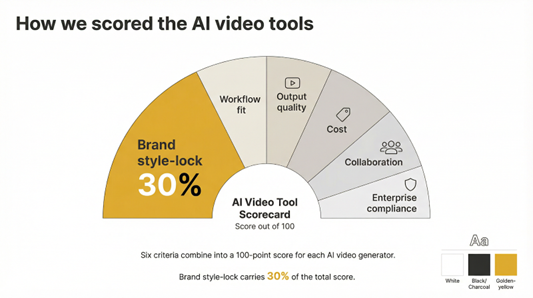
Next, we built a six-point scorecard. Brand style-lock carried the most weight at thirty percent. Workflow fit came next, followed by output quality, cost, collaboration, and enterprise compliance. Each tool earned a score out of one hundred, with bonus points for extras such as custom avatars, single sign-on, or 4K export.
Finally, we stress-tested fifteen platforms with the same script, logo, and color palette. Seven preserved identity without manual fixes. Those seven are the ones you will explore next.
That is the process: transparent, repeatable, and focused on brand consistency.
At a glance: how the top tools stack up
You know the contenders and the criteria. Here is the quick reference you will share with the team.
| Tool | Brand control | Workflow fit | Output quality | Team collaboration | Compliance | Starting price |
| Synthesia | Brand Kit, custom avatars | API, Zapier | Lifelike 1080p avatars | Multi-user, version history | ISO 27001 | $30/mo |
| Colossyan | Brand Kit, logo on avatar clothing | Slide editor, API | 1080p avatars | Roles, template locking | SOC 2 | $42/mo |
| InVideo | One-click brand presets | 5,000+ templates, social publish | 1080p templates, 4K on enterprise | Live co-editing | SSO on enterprise | $20/mo |
| Leonardo AI | Style-trained models via API | Dev-friendly, team workspaces | 1080p generative visuals | Asset sharing | Data-privacy controls | $24/mo (usage) |
| HeyGen | Custom avatars, manual assets | CRM integrations, templates | 1080p avatars | Basic workspace | Standard cloud security | $30/mo |
| Pictory | Logo, colors, fonts auto-applied | Blog-to-video wizard | 1080p stock montage | Share links | SMB cloud security | $39/mo |
| Lumen5 | Brand kits and presets | Hootsuite, CMS hooks | 1080p text videos | Shared templates | Enterprise plan offered | $79/mo |
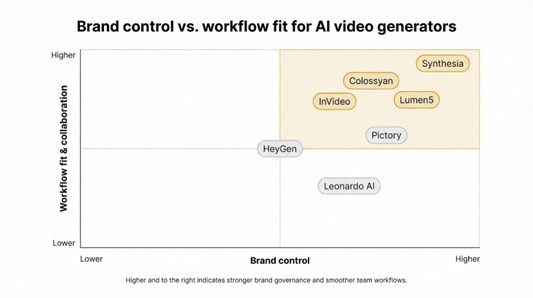
Facts only sketch the map. A quick scan shows Synthesia and Colossyan leading on governance, InVideo owning template variety and teamwork, and Leonardo bringing the adventurous option for creative visuals. Keep this table handy as we explore each platform’s personality.
Synthesia: your polished spokesperson on demand
Synthesia feels like a fully staffed video studio inside your browser. Type a script, pick an avatar, and seconds later a lifelike presenter delivers your message in crisp 1080p.
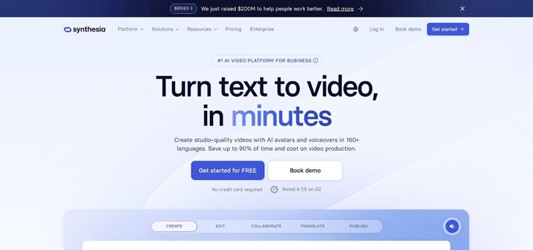
Control is the real draw for brand teams. A built-in Brand Kit locks logos, colors, and fonts so every lower-third or background follows the same visual language. On the corporate tier, you can even commission a custom avatar that never misses a line.
Workflow fits neatly into modern stacks. Zapier recipes send finished clips to your LMS or CRM, while a REST API automates high-volume jobs such as localized product updates. Teams work safely through roles and version history, and security teams nod in approval: Synthesia now holds the ISO 27001 badge Fortune 100 vendors rely on.
Where it shines
Consistency at scale. Once the visual rails are set, hundreds of videos leave the station looking like siblings, not strangers.
Where it stumbles
Creativity stays limited to talking-head formats. Campaigns that need cinematic motion will require a second tool.
Best for
Enterprises that produce training, explainers, and global walk-throughs and need them fast without sacrificing brand polish.
Colossyan: dress your avatar in company colors
If Synthesia feels like a broadcast studio, Colossyan is closer to a slide deck that talks back.
Open the editor and you are greeted by scene cards, one for each idea you need to land. Add your script, pick an avatar, then click Brand Kit. Your logo drops into the corner, text shifts to corporate fonts, and buttons adopt your hex codes. The virtual presenter can even wear branded apparel, turning every video into a walking billboard for your identity.
Teams appreciate the safety rails. You can lock templates so no one swaps colors at 11 pm before launch. Version history tracks every tweak, and role-based permissions keep interns from publishing a global announcement by mistake.
Speed is another draw. Colossyan renders faster than most avatar tools, so a five-minute training module can be live before your coffee cools. Multilanguage support lets the same avatar greet viewers in Spanish, Hindi, or Polish without extra shoots, preserving a consistent global voice.
The trade-off is choice. The avatar catalog is smaller than Synthesia’s, and the overall vibe skews business-formal. If your brand needs streetwear or cinematic motion, look elsewhere. For B2B firms that value strict compliance and uniform visuals across regions, Colossyan is a quiet powerhouse.
Bottom line: when you need avatars wearing your badge, saying the right words, and staying on script, Colossyan delivers with precision.
InVideo: templates that wear your logo out of the box
Some teams need fewer avatars and more room to shape stories. InVideo is a browser-based editor with more than 5,000 templates that adapt to your style in one click.
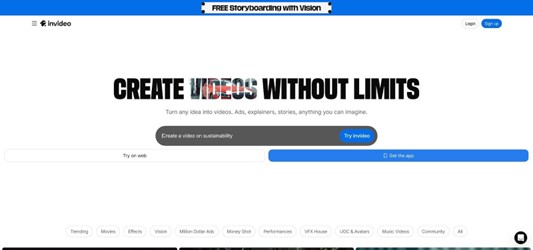
Set up a Brand Preset once (logo file, primary and secondary colors, go-to fonts). From then on, any template you open swaps blues for your greens, headlines for your custom typeface, and drops your mark in the corner. It feels like having a motion designer who never forgets the style guide.
Because InVideo runs on a live timeline, you can fine-tune everything: trim scenes, swap stock clips, adjust transitions, even add voiceovers on the fly. Multiple teammates can jump in together, commenting in real time while changes sync instantly. That collaboration cuts revision cycles in half compared with emailing draft exports.
Export in 16:9, square, or vertical without rebuilding the project; handy when social teams ask for Reels five minutes after the YouTube cut is approved. If you need future-proof quality, the enterprise tier provides access to true 4K.
InVideo’s only catch is manual effort. It automates brand styling, but story structure remains on your shoulders. For marketers who enjoy shaping a piece yet dislike fiddling with color codes, that trade-off feels fair.
Leonardo AI: train the style, then let it run wild
Leonardo approaches brand consistency from the opposite angle. Instead of adding another siloed app, the company rolls all capabilities into Leonardo’s creator suite, a full-stack workspace that lets you generate, upscale, and animate assets without hopping between tools. Its Motion video generator alone has already produced more than 2.7 million clips after learning your color palette, lighting, and design quirks.
Upload reference images, palettes, and mood boards. The platform fine-tunes a private model that learns your color ratios, lighting preferences, and design quirks. After that, text-to-video prompts produce clips that feel as if your art team storyboarded them first.
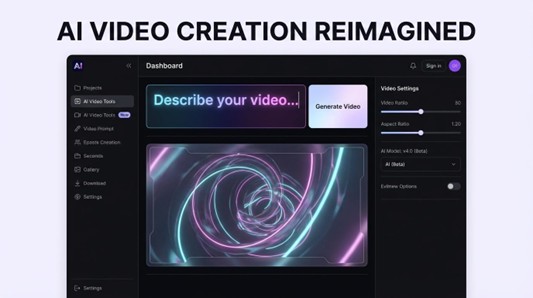
Leonardo houses several generation engines in one workspace, so you can dial output from photoreal to painterly without switching tools. This range lets you match the right vibe to each campaign while keeping within brand guardrails.
On the practical side, an extensive API connects Leonardo to your CMS and produces short product loops whenever a new SKU goes live. Teams share assets in common libraries, and credit-based pricing scales from weekend trials to enterprise pipelines.
You will still need patience. Generative video can surprise you, so expect a few revision cycles before colors match Pantone codes or logos land perfectly. Clips remain short, usually seconds rather than minutes. Pair Leonardo with a traditional editor for long-form work and you gain creative visuals that stay on brand.
HeyGen: personalized video at prospect speed
HeyGen scratches a different itch: watching an avatar greet each viewer by name.
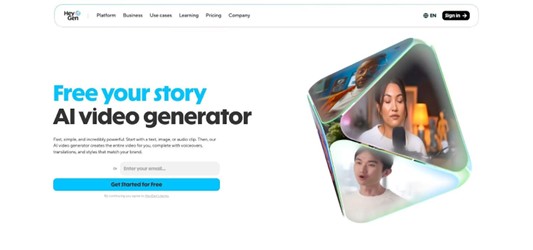
Inside its drag-and-drop studio you will find dozens of marketing-ready layouts. Add a merge tag for “first_name,” paste your script, and the avatar records a bespoke greeting for every contact on your list. API hooks let sales tools trigger creation automatically, so welcome videos land before leads finish their coffee.
Brand control is manual but quick. Upload a background, add your watermark, and save the scene as a template. Every rep can duplicate it without risking off-brand colors or fonts. Order a custom avatar and the same friendly face anchors campaigns across quarters, boosting recall.
Gesture options keep clips lively: avatars can nod, point, or give a thumbs-up without awkward lag. Voice support spans more than forty languages, and lip sync seldom misses a phoneme.
Limitations? There is no formal brand kit panel, and collaboration stops at basic workspace sharing. If your legal team needs locked templates, consider Synthesia or InVideo. For growth teams that crave personalized video at scale while keeping a polished look, HeyGen earns a spot on the shortlist.
Pictory: turn blogs into branded snack-size clips
Writing a strong article is only half the battle. Pictory converts that long-form win into scroll-stopping video without forcing you to touch a timeline.
Paste a URL or drop in a script. The AI skims key points, pairs each with stock footage, and adds large, social-friendly captions. One tap on the Branding tab splashes your logo, fonts, and colors across every scene. No hex codes, no guesswork, only instant on-brand motion graphics.
Because the engine handles the heavy lifting, you work at content-marketing speed. A five-minute read can become a ninety-second LinkedIn teaser in ten minutes flat. Export square for feeds, vertical for Reels, or widescreen for YouTube, all from the same project.
Limitations remain. You are working with stock visuals, so uniqueness depends on your curation, and complex motion design stays out of reach. Yet for teams rich in prose and hungry for video, Pictory feels like oxygen.
Lumen5: social storytelling on cruise control
Lumen5 earned its reputation by helping brands turn text into share-worthy story videos. The latest release adds a full Brand Kit, so every slide it assembles already wears your colors.
Start by pasting an article link or raw copy. The AI highlights sound-bite sentences, drops them into a storyboard, and suggests matching b-roll. Tap “apply brand,” and the palette, typography, and watermark lock across the timeline. The flow feels effortless, especially for teams juggling multiple posts a week.
The editor stays lightweight by design. Shuffle scenes, tweak copy, or swap footage without touching keyframes. A media library packed with GIFs and square-friendly motion graphics makes Lumen5 a natural fit for LinkedIn carousels and TikTok teasers.
Trade-offs exist. Resolution tops out at 1080p on most plans, and advanced animation controls are scarce. If the mission is to keep social channels stocked with on-brand micro-stories while your writers rest, Lumen5 is a reliable co-pilot.
Which one fits your workflow?
You have met seven solid contenders. Picking the right partner depends on how, and how often, you create video.
Start with format. If nearly every project needs a human presenter, choose Synthesia or Colossyan. They keep talking-head footage uniform across languages and time zones. Prefer text stories or listicles? Pictory and Lumen5 turn those out in minutes and stay on brand without extra clicks. Need maximum creative latitude, such as product teasers that feel like science-fiction trailers? Leonardo’s model-training approach hands you the paintbrush.
Next, weigh volume. Daily social posts call for template speed and real-time collaboration, a lane InVideo owns. Personalized outbound messages? HeyGen’s merge tags and CRM triggers save the day.
Compliance matters too. Enterprises in finance, health, or government can relax with Synthesia’s ISO certification or Colossyan’s SOC 2 controls. Smaller teams may trade deep audits for lower monthly fees.
Finally, match budget to output minutes. A $30 plan that covers ten minutes feels roomy if you release two explainers a month. When you scale to hundreds of personalized clips, an API-driven enterprise tier quickly pays for itself.
Answer those four questions—format, volume, compliance, and budget—and the best fit will stand out.
Pro tips for a brand-safe roll-out
Lock your look before the first render. Upload logos, colors, and fonts to the tool’s brand kit, or build a template file if the kit is missing. That single step prevents late-night “who changed the blue?” panics.
Name one owner of the style guide. Their job is to approve the first three videos, spot gaps, and document rules in plain English: which avatar to use, where the watermark sits, and how long the intro sting runs. Share the doc in the same folder as your templates so no one hunts for it.
Treat AI scripts like ad copy. Read them aloud, tighten verbs, and swap jargon for plain speech. A crisp script shortens production time more than any render tweak.
Sneak in a test week. Pick one campaign, produce it with the new platform, and push the results through your normal review chain. Time every step. The data arms you when it is budget-renewal season.
Finally, keep a “hall of fame” reel. Drop the best AI videos there. New teammates learn faster by watching success than by paging through guidelines, and leadership sees the brand stay consistent even as output soars.
Conclusion: AI video trends to watch
First, prepare for emotions on demand. Research labs already show avatars that laugh, sigh, or lift an eyebrow convincingly. When those models hit commercial tools, your how-to clips will feel less like lectures and more like conversations.
Personalization will deepen, too. Instead of greeting prospects by name, future clips will swap product shots, pricing, and even backgrounds based on CRM data. The technology exists; broad rollout depends on a friendlier interface.
Interactive video is coming. Shoppable hotspots and choose-your-own-demo branches are moving from pilot projects to everyday practice. When they arrive, brand rules must cover button styles, hover colors, and micro-copy tone, not just video frames.
Regulations are tightening. Several regions plan disclosure laws for synthetic media. Add a small “Created with AI” tag in your lower-thirds now and you will stay ahead of new rules later.
Finally, speed keeps climbing. Tasks that take minutes to render today will take seconds next year. When production time drops toward real time, the only bottleneck left will be your approval workflow, so streamline it early.
To read more content like this, explore The Brand Hopper
Subscribe to our newsletter