Last Updated on September 21, 2026 by Team TBH
Choosing your first design tool matters more than most people realize.
Pick the wrong one and you’ll spend weeks fighting an unintuitive interface before you ever finish a single Instagram post or resume.
Canva and Adobe Express are the two most popular answers to “which design tool should a beginner actually use,” and for good reason — both are free to start, both run entirely in the browser (with mobile apps too), and both have poured enormous resources into AI-powered shortcuts that let non-designers produce professional-looking work in minutes.
But they come from very different corporate DNA: Canva was built from day one as a democratized, template-first tool for everyday users, while Adobe Express is Adobe’s newer, simplified on-ramp into a company that has spent four decades building the industry’s most powerful (and complex) creative software.
Here’s the complete comparison to help you decide which one deserves your first hour of design time.
What Is Canva? A Template-First Platform Built for Everyone
Canva was founded in 2012 by Melanie Perkins, Cliff Obrecht, and Cameron Adams in Perth, Australia, with a founding mission to make design accessible to people who had never opened a professional design tool in their life.
That mission has scaled dramatically: Canva now counts roughly 260-265 million monthly active users worldwide, has been profitable for eight consecutive years, and reported annualized revenue crossing $3.5-4 billion in 2025 at a private valuation of approximately $42 billion following an August 2025 employee share sale — figures that have fueled persistent speculation about a Canva IPO as early as late 2026 or 2027.
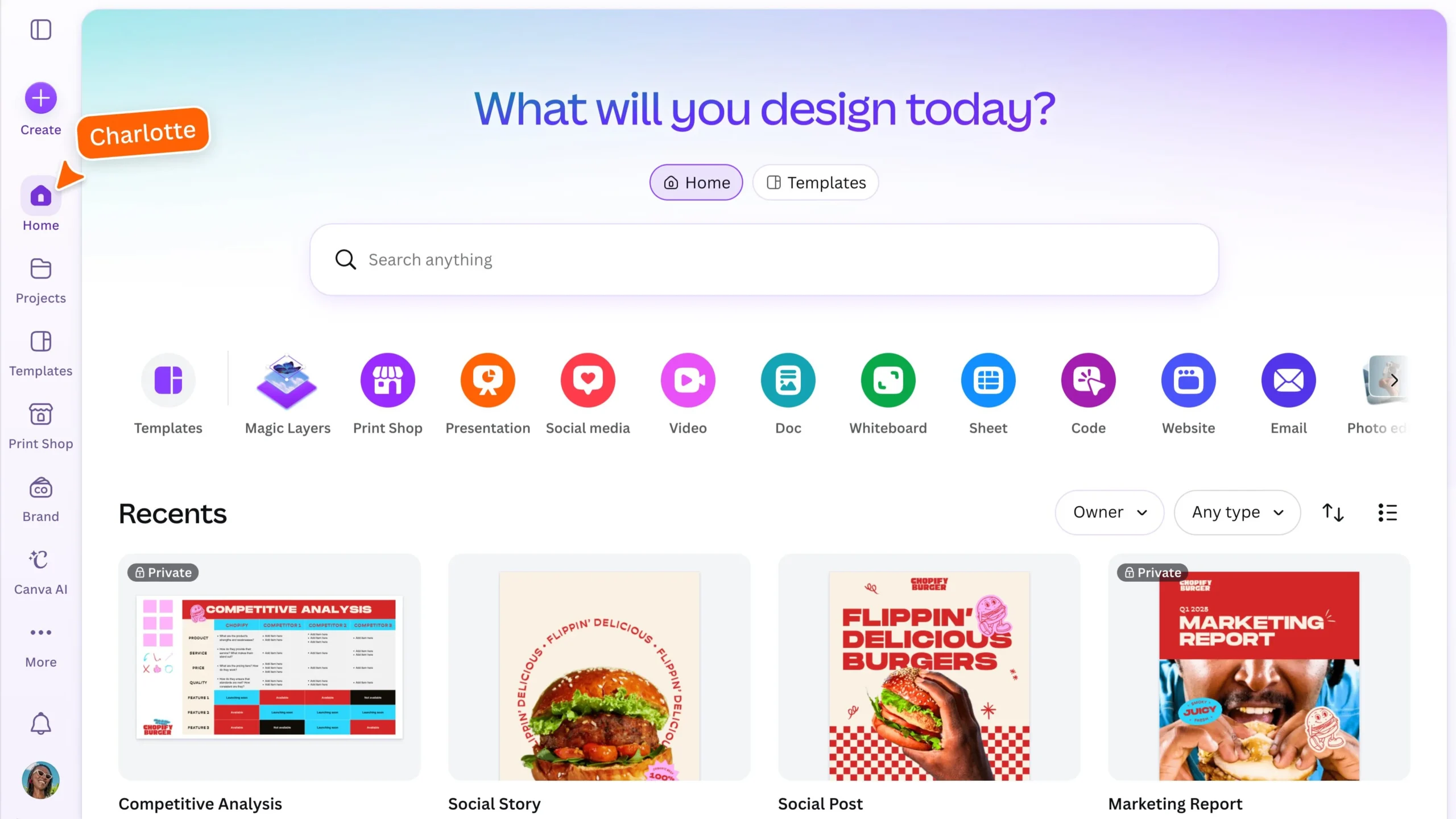
The platform’s core appeal for beginners is its template library, which spans millions of pre-built designs across social media graphics, presentations, resumes, posters, videos, and virtually every other visual format a small business or student might need, all editable through a simple drag-and-drop interface that requires zero prior design training.
Canva’s AI suite, branded Magic Studio, now handles roughly 800 million AI tool uses per month — up 700% year-over-year — spanning background removal, text-to-image generation, Magic Write copywriting, and one-click resizing across formats.
What Is Adobe Express? Adobe’s Simplified Gateway Into Its Ecosystem
Adobe Express is Adobe’s answer to Canva, built and repositioned over the past few years as a streamlined, beginner-accessible alternative to the company’s famously powerful but complex flagship tools like Photoshop and Illustrator.
Rather than a standalone startup, Adobe Express is backed by Adobe’s full corporate weight and, critically, by direct integration with Adobe Firefly, Adobe’s family of generative AI models trained specifically on licensed and public-domain content to minimize copyright risk for commercial and client work.
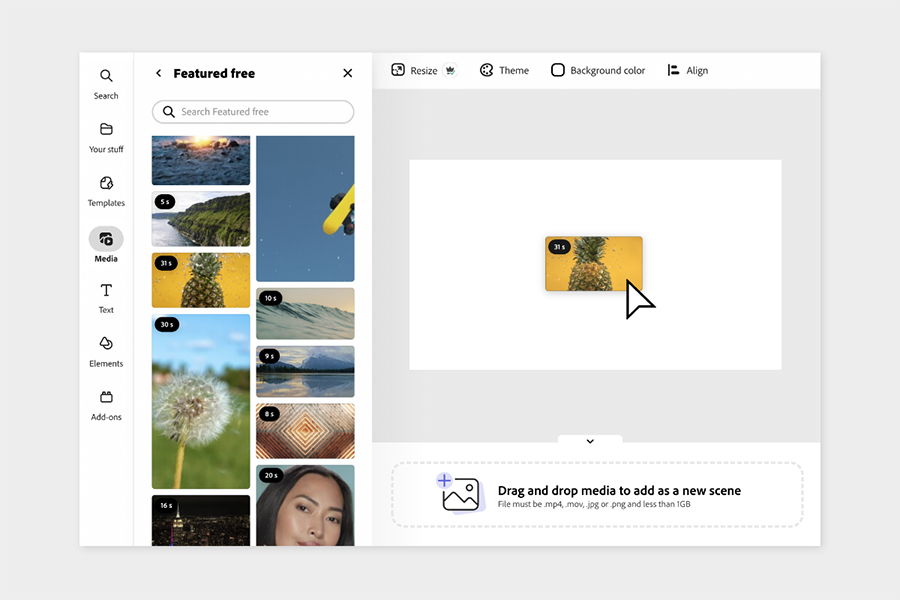
That safety-focused AI positioning has become a genuine differentiator: through 2025 and 2026, Adobe has expanded Firefly into a broader AI marketplace inside Express, layering in third-party generative models from Google, OpenAI, Black Forest Labs, Runway, Pika, Ideogram, Luma AI, and Moonvalley alongside Adobe’s own native engine, giving Express users access to a wider spread of AI image and video generation styles than most single-vendor competitors.
Adobe’s overall ecosystem — spanning Acrobat, Creative Cloud, Express, and Firefly together — surpassed 1 billion monthly active users for the first time in September 2026, according to the company’s record Q3 2026 earnings report, with Express itself showing particularly fast mobile growth: a 96% quarter-on-quarter increase in mobile monthly active users and an 86% year-on-year rise in total creations.
Ease of Use: Which Tool Is Actually Easier for a True Beginner?
This is where the two platforms diverge most in practice, even though both market themselves as beginner-friendly.
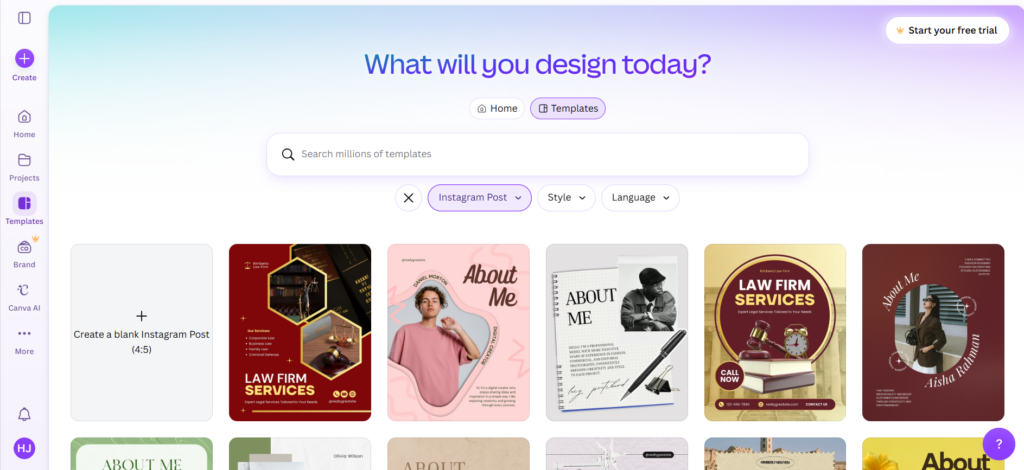
Canva’s interface leans almost entirely on visual template browsing — a new user typically starts by searching for what they want (“Instagram post,” “resume,” “birthday flyer”) and immediately sees hundreds of ready-made options to customize, which minimizes the blank-page problem that intimidates most design beginners.
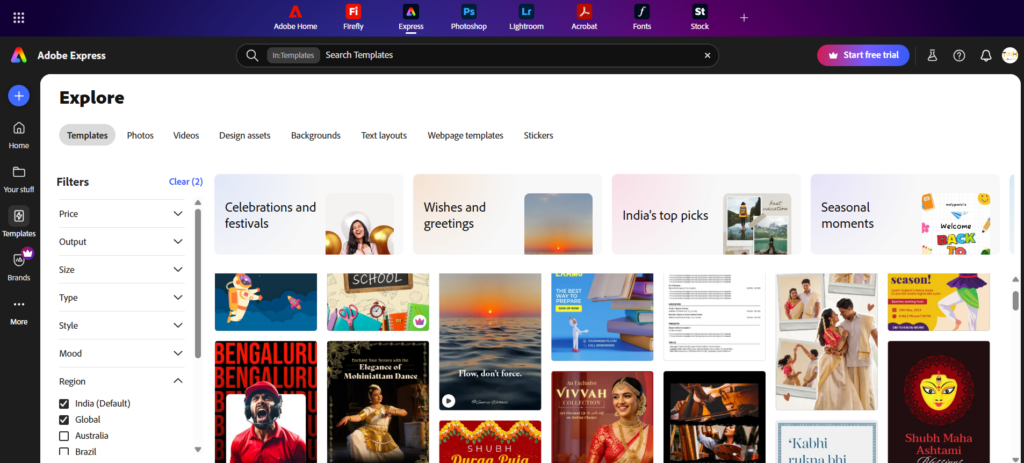
Adobe Express follows a broadly similar template-first approach, but its interface and toolset carry slightly more of Adobe’s professional-software design language, meaning some first-time users report a marginally steeper initial learning curve compared to Canva’s almost consumer-app-like simplicity.
That said, Adobe Express compensates with tighter, more guided AI workflows for specific tasks (like generative fill or object removal), which can actually make certain edits easier for beginners once they get past the initial interface, even if the overall platform feels a notch more “professional” than Canva’s approach.
Templates and Design Assets: Breadth vs. Curation
Canva’s single biggest structural advantage for beginners is sheer template volume — the platform offers millions of templates across an enormous range of categories, fonts, stock photos, and design elements, most of it accessible on the free plan with additional premium assets unlocked via Canva Pro.
Adobe Express offers a smaller but generally well-curated template library, benefiting from Adobe’s decades of design and typography expertise, along with direct access to Adobe Stock assets, which tend to skew toward a more polished, professional aesthetic than some of Canva’s more casual, user-submitted-style templates.
For a beginner building a first resume, presentation, or social post, Canva’s breadth typically means faster results simply because there’s a higher likelihood of finding something close to what you envisioned already built.
AI Features: Magic Studio vs. Firefly
Both platforms have made generative AI central to their 2025-2026 roadmaps, but they approach it differently.
Canva’s Magic Studio bundles a wide range of AI shortcuts — Magic Write for AI copywriting, Magic Eraser and Background Remover for quick image cleanup, Magic Media for text-to-image and text-to-video generation, and Magic Resize for reformatting a single design across dozens of platform-specific dimensions — all built directly into the core editor with minimal extra clicks, reflecting the platform’s usage scale of roughly 800 million AI actions per month.
Adobe Express leans on Firefly, Adobe’s generative AI model family specifically trained on licensed content for commercial safety, alongside Adobe’s expanding multi-model marketplace that now includes third-party engines from Google, OpenAI, and several other AI labs, giving Express users meaningfully more stylistic variety in AI-generated images and video than Canva currently offers in a single platform.
For beginners focused purely on speed and simplicity, Canva’s more tightly integrated AI toolkit tends to feel faster to learn; for beginners who care about commercial-use safety or want access to multiple AI model styles, Adobe Express’s Firefly-centered approach has a real edge.
Pricing: Free Plans, Pro Tiers, and What You Actually Get
Canva’s free plan remains one of the most generous in the category, including access to millions of templates, full presentation-building tools, basic Magic Studio AI features, and standard exports to PDF, PPTX, and image formats, plus 5GB of storage — enough for most casual beginners to never need to pay at all.
Canva Pro costs $18/month billed monthly, or roughly $15/month (about $180/year) on annual billing, unlocking Brand Kits, the Background Remover, expanded Magic Studio AI capabilities, and premium template and stock access; Canva’s Business/Teams tier moved to per-seat pricing at $25/user/month following a late-2024 restructuring of its old flat-rate team plans.
Adobe Express’s free plan includes 25 generative AI credits per month with no rollover — noticeably more limited than Canva’s AI allowance — while Adobe Express Premium costs $9.99/month (or $99.99/year), and the AI-heavy Firefly Pro tier sits at $19.99/month for expanded generative credits.
Taken together, Canva’s free tier is the more generous entry point for a true beginner on a zero budget, while Adobe Express’s cheaper $9.99 Premium tier undercuts Canva Pro for beginners who are ready to pay a little but don’t need Canva’s full AI allowance.
Which One Should a Beginner Actually Choose?
The honest answer depends on where you expect your design journey to go next.
If you’re a total beginner — a small business owner, student, content creator, or job seeker who just needs to produce clean, professional-looking graphics quickly without any prior design background — Canva’s larger template library, more generous free plan, and gentler learning curve make it the safer first choice for most people, which is reflected in its far larger 260-265 million monthly user base relative to Express specifically.
If you already use or plan to eventually use other Adobe products, care about AI-generated content being trained on licensed, commercially-safe material, or want access to a wider variety of third-party AI models inside one platform, Adobe Express is a genuinely strong beginner tool that also sets you up more naturally to graduate into Photoshop, Illustrator, or Premiere Pro later, since it shares design language and some file compatibility with the broader Creative Cloud suite.
Many beginners, in practice, end up using both: Canva for fast day-to-day social and marketing graphics, and Adobe Express (or eventually full Adobe Creative Cloud apps) when a project calls for more polish or Adobe-specific integration.
Canva vs. Adobe Express at a Glance
| Category | Canva | Adobe Express |
| Founded | 2012 (Perth, Australia) | Relaunched as Express in 2020 (Adobe, founded 1982) |
| Founders / parent | Melanie Perkins, Cliff Obrecht, Cameron Adams | Adobe Inc. |
| Monthly active users | ~260-265 million | Part of Adobe’s 1 billion+ combined MAU (Sept 2026) |
| 2025/2026 revenue / valuation | ~$3.5-4B ARR; ~$42B valuation | Adobe Q3 2026 revenue: $6.76B (company-wide) |
| Free plan AI allowance | Basic Magic Studio AI included | 25 generative AI credits/month, no rollover |
| Paid entry tier | Canva Pro: $18/mo (~$15/mo annual) | Premium: $9.99/mo ($99.99/yr) |
| Top AI tier | Canva Pro/Business Magic Studio | Firefly Pro: $19.99/mo |
| Team pricing | Business: $25/user/month | Teams: custom pricing |
| Template library | Millions of templates, broad coverage | Smaller, more curated, Adobe Stock-backed |
| Signature AI engine | Magic Studio (~800M uses/month) | Adobe Firefly + third-party model marketplace |
| Best for | Total design beginners, fastest on-ramp | Beginners wanting Adobe ecosystem integration |
Key Takeaways
Both Canva and Adobe Express are genuinely strong, beginner-friendly design platforms, but they suit slightly different beginners: Canva, with its roughly 260-265 million monthly users and more generous free plan, remains the easier and faster on-ramp for total design novices, while Adobe Express — backed by Adobe’s ecosystem that crossed 1 billion combined monthly active users in September 2026 — offers a smaller but more curated template library, Firefly’s commercially-safe generative AI, and a smoother future path into professional Adobe software.
Pricing favors Canva’s free tier for AI-light beginners on a zero budget, while Adobe Express’s $9.99/month Premium plan undercuts Canva Pro’s $15-18/month for those ready to pay a little for cleaner, Adobe-quality templates.
Ultimately, the “best” choice comes down to whether you value Canva’s breadth and simplicity or Adobe Express’s polish and ecosystem integration.
Frequently Asked Questions
Q: Which is better for beginners, Canva or Adobe Express?
A: Canva is generally easier for total beginners thanks to its larger template library, simpler drag-and-drop interface, and more generous free plan. Adobe Express is a strong alternative for beginners who want Adobe’s design polish, commercially-safe Firefly AI, or an eventual path into Photoshop or Illustrator.
Q: Is Canva or Adobe Express free?
A: Both offer free plans. Canva’s free plan includes millions of templates, basic Magic Studio AI, and 5GB of storage. Adobe Express’s free plan includes 25 generative AI credits per month with no rollover, which is more limited than Canva’s free AI allowance.
Q: How much does Canva Pro cost in 2026?
A: Canva Pro costs $18/month billed monthly, or approximately $15/month ($180/year) on annual billing, unlocking Brand Kits, Background Remover, and expanded Magic Studio AI features.
Q: How much does Adobe Express cost in 2026?
A: Adobe Express Premium costs $9.99/month ($99.99/year), while the AI-heavy Firefly Pro tier costs $19.99/month for expanded generative AI credits.
Q: How many people use Canva?
A: Canva has roughly 260-265 million monthly active users as of 2025/2026, with over 31 million paid subscribers, and generated annualized revenue crossing $3.5-4 billion in 2025 at a $42 billion valuation.
Q: How many people use Adobe Express?
A: Adobe doesn’t break out Express-specific user numbers separately, but the company’s broader ecosystem (Acrobat, Creative Cloud, Express, and Firefly combined) surpassed 1 billion monthly active users in September 2026, with Express posting a 96% quarter-on-quarter jump in mobile users.
Q: Does Adobe Express use the same AI as Photoshop?
A: Adobe Express uses Adobe Firefly, the same generative AI model family used across Adobe’s Creative Cloud apps including Photoshop, trained specifically on licensed and public-domain content for commercial safety, alongside an expanding marketplace of third-party AI models from providers like Google and OpenAI.
Q: Can I use Canva and Adobe Express together?
A: Yes. Many users combine both — using Canva for fast day-to-day social media and marketing graphics, and Adobe Express (or full Adobe Creative Cloud apps) for projects requiring more polish or Adobe-specific integration and file compatibility.
Also Read:
- GoPro vs DJI: Best Action Camera Brand?
- Intel vs AMD: Which CPU Brand Is Better?
- PayPal vs Stripe: Which Payment Processor Wins in 2026?
To read more content like this, subscribe to our newsletter