Last Updated on October 21, 2026 by Team TBH
AI headshot apps have outgrown the simple “tidy my selfie.” Some retouch the exact image you submit, others create new angles from one reference, and a third tier trains a private model of your face for ongoing shoots. Choosing the right lane affects speed, privacy, and price. This guide shows how 14 top tools fit into those three workflows, so you can select the safest, quickest, or most adaptable option for your brand.
One-minute decision guide
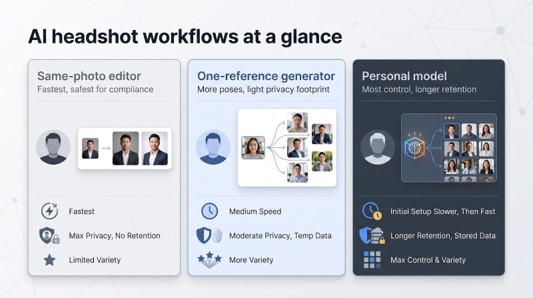
Need a headshot fast? Match your situation to the table below to choose the right tool in seconds.
| Your need | Best workflow | Key upside | Main compromise |
| “I have one decent selfie and an interview tomorrow.” | Same-photo editor | 10-second turnaround, no likeness drift | No new poses or outfits |
| “I want a few fresh looks for LinkedIn and my portfolio.” | One-reference identity generator | New angles and backdrops from one upload | Minor face drift between shots |
| “Our remote team must share uniform, on-brand portraits.” | Personalized face model | Central dashboard, locked styles, bulk pricing | Photos and private models stay on the server longer |
| “My image is core to my public reputation.” | Professional photographer or human-in-the-loop service | Directed expression, liability coverage | Higher cost and calendar time |
If your scenario appears above, jump to that section. Otherwise, keep reading; we’ll compare realism, privacy, speed, and price for each workflow.
The three kinds of AI headshot software
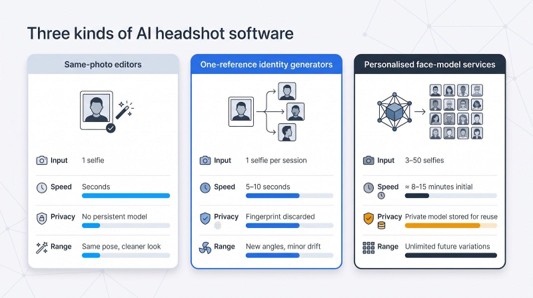
AI headshot tools fit into three technical camps. Knowing which camp you’re in helps you predict speed, privacy, and creative range.
Same-photo editors
These apps act like instant retouchers. Upload one image, and the software keeps your pose while refreshing lighting, background, and small skin details. Since no new facial pixels are created, likeness drift stays near zero and results appear within seconds. Vendors say source files are deleted when processing finishes; confirm that policy before you upload.
Best for: last-minute LinkedIn fixes, strict ID photos, or teams that forbid long-term biometric storage.
Limits: no new angles, outfits, or expressions.
One-reference identity generators
Here a single selfie conditions each prompt, creating fresh poses without storing a reusable model. The gallery renders in five to ten seconds, and the facial fingerprint is discarded afterward, so the privacy footprint is lighter than full model training.
Best for: freelancers who need half a dozen looks fast.
Limits: subtle features (earrings, hair part) can drift between shots.
Personalised face-model services
These services train a private mini-model (often 3 to 50 photos, about 8–15 minutes of processing) and keep it on their servers for repeat shoots. You can return weeks later, type “sunlit terrace, navy blazer,” and generate new images without re-uploading.
Best for: remote teams that need uniform, on-brand portraits and professionals who want unlimited future variations.
Magic Studio is a clear example of this tier: you upload about 10 photos, it trains a private model for your shoot, and it returns 50 headshots in five looks.
Magic Studio deletes your data automatically 30 days after your headshots are created, and you can delete it sooner yourself.
Knowing which bucket a tool belongs to makes the rest of this guide, and your eventual purchase, much simpler.
How to compare tools before you buy
Marketing pages all promise “studio quality.” The fairest way to choose is to run every tool you shortlist through the same simple routine, so the results are apples to apples.
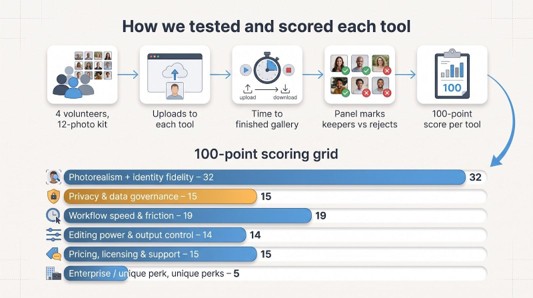
- Use one photo kit. Prepare a single set of recent photos (varied angles, lighting, and backgrounds, with your current glasses and hairstyle) and upload the same set to each tool. If a tool offers a single-selfie workflow, try it with your best photo from the set to see how it handles minimal input.
- Note the real turnaround. Vendor timing claims vary by tier and queue. Check when the gallery actually arrives, not just what the pricing page says.
- Count usable images. Mark every file “publish-ready” or “reject.” The number of keepers is more useful than headline claims like “200 photos.” If you can, ask a colleague who knows your face to help, because you are not the best judge of your own likeness.
- Weigh what matters. A simple 100-point grid keeps the decision honest. One reasonable split:
- Photorealism + identity fidelity 32
- Privacy and data governance 15
- Workflow speed and friction 19
- Editing power and output control 14
- Pricing, licensing, and support 15
- Enterprise or unique perks 5
- Re-check after updates. Vendors ship new models and change privacy terms often. Re-read the policy and look at fresh samples whenever a tool you rely on announces a new version.
A neat interface cannot hide fuzzy retention rules or low-res exports; give every tool the same playbook.
The 14 tools, profile by profile
Magic Studio
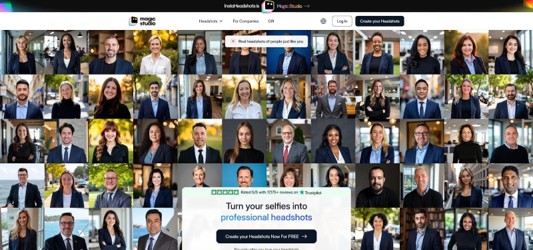
LinkedIn statistics suggest profiles with a professional headshot attract 21 times more views and are 36 times likelier to receive a message. Magic Studio trains a private model on about 10 selfies, then delivers 50 LinkedIn headshots in 15 to 60 minutes, depending on the pack. You can select up to five preset looks (charcoal backdrop, warm daylight, brand-blue gradient) while the engine works in the background.
Why it stands out
- Pay after preview: you only pay if you love your headshots and want to keep them.
- Private model: it trains a model for your shoot only, and your photos are not used for any other training.
- Clear data rules: data is deleted automatically 30 days after your headshots are created, or sooner if you delete it yourself.
- A usable refund rule: if you get fewer than four decent headshots and have not downloaded any, it refunds your payment when you ask within three days.
Good to know
- Inputs: about 10 photos with different backgrounds, angles and lighting give the best likeness.
- Files: standard exports are 1024 × 1024 px, which suits LinkedIn; larger files for print cost a small fee.
- Price: the Starter pack is $59 for 50 headshots in five looks. Basic and Premium packs are faster, and all three are one-time purchases with no subscription.
- Teams: a separate Teams option lets an admin invite members by email or create headshots on their behalf, with backdrops and outfits set once for one consistent look. Per-person pricing is lower than individual pricing.
Choose Magic Studio if you want realistic LinkedIn headshots, clear deletion rules and no payment until you have seen the results.
HeadshotPro
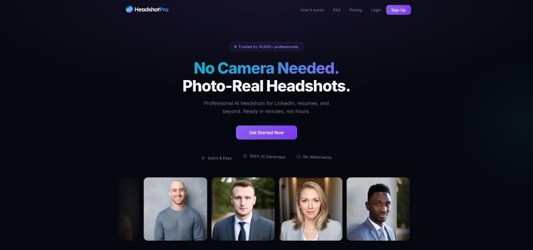
HeadshotPro’s March 2026 update trims the input requirement to one–three selfies and still returns about 40 studio-grade shots in roughly 10 minutes. It rivals one-tap mobile apps for speed while keeping the flexibility of a private model.
Why teams like it
- Minimal inputs: New hires can send a single phone selfie instead of 12 staged portraits.
- Locked styling: The admin console fixes backdrop, crop, and file name, so every employee appears in a consistent grid.
- Pose-safe edits: The built-in editor lets you relight or recolor a background without changing face or posture.
Pricing and policies
Entry bundles start around $29 for 40 images. Some checkout pages still list older 30 / 50 / 70-image tiers, so confirm the quota before you pay. The company says uploads, the personal model, and outputs delete 30 days after your last activity, a competitive window worth confirming now that the low-input workflow is live.
Choose HeadshotPro when you need fast, on-brand portraits at scale without a lengthy photo-collection phase.
Dreamwave
Dreamwave prioritizes privacy without slowing you down. Upload one selfie, pick 40, 60, or 100 outputs, and the gallery arrives in about 15 minutes.
Data governance
- Personal model is processed and stored on U.S. servers, useful for companies with data-residency clauses.
- Uploads, model, and outputs delete after 30 days of inactivity (the timer resets each time you download or regenerate), according to dreamwave.ai.
- A one-click delete option removes everything sooner.
Team features
A lead can lock background color, crop, and facial expression before inviting colleagues, so every headshot matches brand guidelines.
Cost
Entry plan: $35 for 40 images (≈ $0.88 per file); larger bundles reduce the per-image price.
Limitations
Edits happen server-side. If a blazer shade feels off, you’ll request a fresh batch; there’s no pose-preserving editor.
Choose Dreamwave when you need a strong privacy posture and shared style controls, not extensive post-generation tweaking.
Aragon AI
Aragon focuses on turnaround speed. Upload six clear selfies, choose a tier, and the gallery can arrive in as little as 15 minutes on the premium plan (about 45 minutes on the entry tier).
Speed tiers
- Entry: ~45 min for 40 images
- Mid: ~25 min for 60 images
- Rush: ~15 min for 40 images
Security and privacy
The company advertises SOC 2 Type II controls and lets enterprise admins set custom deletion windows. Individual users can delete all data right after download, but the site does not list a default retention period, so set a calendar reminder if you need an automatic purge.
Visual style
Check whether the default look suits your brand. A bright, polished, tech-company style with sharp edges flatters most corporate profiles, but it can look over-processed on softer lifestyle brands. No pose-safe editor exists; you must regenerate if lighting or wardrobe miss the mark.
Cost
Plans start at $35 for 40 images (≈ $0.88 each), similar to Dreamwave and HeadshotPro entry bundles.
Pick Aragon when an executive bio is due today and speed outweighs fine-grained editing control.
BetterPic
BetterPic puts resolution first. Upload 6–12 selfies and the starter pack returns 20 portraits at native 4 K, large enough for keynote slides or booth banners. Paid add-ons let you hire human retouchers to tidy stray hairs or re-crop a collar.
Editing power
A pose-locked editor lets you swap jackets, change backdrops, or reduce skin shine without regenerating the face, which is useful for marketers juggling web, print, and event assets.
Privacy mismatch
The landing page says all files delete after 30 days of inactivity, but the October 2025 privacy policy allows the company to keep source photos for up to one year and your personalized model for as long as three years. If your legal team needs short-lived biometric data, get written clarification first.
Cost
Entry price: $35 for 20 images (≈ $1.75 each). The per-image rate falls at the 60-photo tier, so volume buyers get better value.
Choose BetterPic when you need print-ready 4 K files and a pose-safe editor, but read the retention fine print before uploading executive headshots.
Proshoot
Proshoot offers a preview-first workflow. Upload four selfies, and the system generates your full gallery (40, 100, or 200 images) with watermarks. If the results miss the mark, you can request a redo or claim a refund within seven days, provided you have not removed the watermarks.
Why that matters
- Catch misfires such as crooked glasses or off-angle jawlines before committing to your purchase.
- Preview the entire batch to confirm the AI captured your likeness accurately.
Speed
- 40-image pack: ≈ 15 minutes
- 100-image pack: ≈ 10 minutes
- 200-image pack: ≈ 5 minutes
Pose-safe edits
An in-app editor lets you keep the exact expression while swapping jackets, changing backdrops, or adjusting lighting. Few rivals combine preview, editing, and a seven-day refund window.
Privacy
Uploads, personalized model, and outputs delete 30 days after your last activity; you can request earlier removal. Marketing copy and legal terms match, so there is no hidden multi-year retention.
Choose Proshoot when you want to inspect results before paying and have the safety net of a refund if the final batch disappoints.
Secta
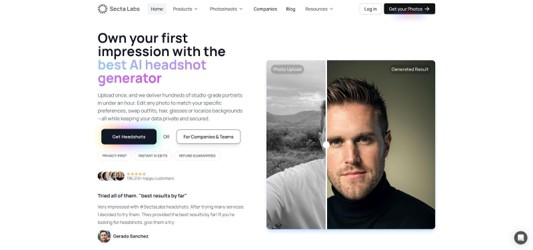
Secta trades a large upload set (20 to 50 photos) for sheer range: up to ≈ 300 images per shoot plus a Remix button that can swap jackets, tweak hair parts, or apply exact HEX brand colors after generation.
Why the big input?
The service trains a high-capacity model that stays consistent across extreme angles and lighting changes. Marketing teams can lock Pantone shades so every spokesperson appears in the same backdrop.
Workflow
- Upload batch: 20–50 varied photos
- Training plus first gallery: ≈ 15 minutes
- Post-shoot edits: pose-locked background, wardrobe, and lighting changes in seconds
Price
Entry package: $49 for ~300 images (roughly $0.16 each, the lowest nominal cost in this guide).
Privacy caveat
Product pages say images and models are “automatically purged,” but the May 2024 legal terms still allow Secta to retain data for internal improvement until you delete the account. Request written confirmation before uploading sensitive faces.
Choose Secta when you value volume and fine-grained brand control over minimal uploads or short retention windows.
The Multiverse AI
For pure value, The Multiverse AI is hard to match. $29 buys ≈ 100 images plus 20 pose-safe edits that let you tweak lighting or wardrobe without extra credits, landing at about $0.29 per file before culling.
Privacy and provenance
- The plain-language policy lists every sub-processor and deletes uploads, model, and outputs 90 days after your last purchase.
- Finished JPEGs carry an IPTC “AI-generated” tag, which helps brands disclose synthetic content.
Image quality
The service trains on a 12-photo baseline, which helps keep identity steady across angles. Check skin texture closely, especially on dark backdrops, where AI tools tend to over-smooth. Add a side-profile selfie if hair shape matters.
Volume caveat
A triple-digit gallery looks generous, but expect clusters of near-duplicates. Set aside time to shortlist favorites and archive the rest.
Choose The Multiverse AI when budget and transparent data handling matter more than minute-by-minute creative control.
HeadshotCam
HeadshotCam lives on your phone and needs just one selfie. Tap Generate, and about five seconds later you receive six pose-varied shots with different backdrops and outfits.
How it works
The app creates a lightweight facial fingerprint for each request and discards it after rendering, so nothing persistent lives on the server. Plain-language prompts such as “navy blazer,” “soft front light,” or “remove glasses” produce new variants in real time.
Speed vs. accuracy
Immediacy comes at the cost of consistency; glasses and eyebrow shape can drift between prompts. If pixel-perfect likeness matters, use a same-photo editor instead.
Pricing and data
- iOS / Android subscription: about $6 per week or $15 per month for unlimited generations (check your local store).
- The company says you can delete images on demand and that files are encrypted in transit. It does not publish a default retention deadline; request written confirmation if compliance is critical.
HeadshotCam excels when you need a quick profile refresh between conference sessions or during a layover. Shoot in good light, inspect results for drift, and you’ll be LinkedIn-ready before boarding.
PhotoTune
PhotoTune turns a single selfie into a studio-quality portrait, with no new poses, just improved lighting and a clean background.
How it works
Upload one image, tap the Headshots tool, and in about three seconds the app swaps cluttered backgrounds, balances exposure, and smooths minor blemishes while keeping every hair strand and eye reflection intact.
Why it’s safe for compliance
Because PhotoTune performs a single-image edit, no personalized model is trained. The company says the source file deletes as soon as the final JPG reaches your device, which suits teams that forbid long-term biometric storage.
Creative scope
Pick from six backdrop colors and three light temperatures. You will not get new angles, wardrobes, or expressions, but you keep pixel-perfect likeness, helpful for passport photos, strict brand guidelines, or authenticity-focused recruiters.
Availability and cost
iPhone only during open beta, with free edits for early users. The roadmap lists a $1 to $2 per-edit fee once the stable version launches.
PhotoTune is the quickest path from “good selfie” to “LinkedIn-ready” when consistency matters more than variety.
Fotor
Fotor offers two portrait paths. Editor Mode polishes a single image, fixing exposure, removing blemishes, and swapping backgrounds; according to the May 2026 privacy policy, the upload deletes immediately after processing. AI Avatar needs 8–15 selfies, trains a mini-model, and returns a batch of stylized headshots; those source photos are stored only until rendering finishes, then wiped.
Outputs land at 1024 px on the long edge, suitable for LinkedIn or slide decks. Need print? An in-app upscaler uses credits to raise resolution.
Pricing
- Basic edits: free with ads
- Pro plan: about $8 per month opens advanced retouching and removes ads
- AI Avatar packs: $4.99 for 30 images or $9.99 for 60 images
Fotor suits creators who tweak selfies daily yet want a quarterly avatar refresh inside one interface. Check the mode label: Editor for instant cleanups, Avatar for new poses, so you always know where your files live and when they disappear.
Remini
Remini offers two separate workflows:
- AI Enhance sharpens a single blurry photo in about 3–5 seconds. The image is stored only during processing unless you tick an extra-consent box that lets Remini keep anonymized snippets for algorithm training (see February 2026 policy update).
- AI Photos uploads 8–12 selfies, trains a private model, and returns 30–40 portraits in roughly 15 minutes. Choosing this mode grants Remini a broader license to retain the personalized model for future requests.
Image quality
The style packs lean cinematic, with a soft bloom. Include side views in your upload set, because profile fidelity tends to drop without them. You pick from style packs instead of granular lighting edits.
Pricing
- AI Enhance: free with ads; pay-per-download starts at $0.99.
- AI Photos: $6.99 per week (iOS) for unlimited generations; heavy users burn through that allowance quickly.
Read every consent screen; the toggle that grants training rights appears once per session.
Use Remini to rescue low-resolution selfies or add gentle gloss to everyday portraits, but pick another tool if you need fine control over wardrobe and lighting.
Lensa
Lensa offers two separate flows:
- Quick edits: brighten eyes, soften skin, and replace a background in about three seconds. The May 2026 privacy policy states that the source file deletes once processing finishes.
- Magic Avatars: upload 10–20 selfies and the app trains a mini Stable Diffusion model of your face in about 15 minutes. Your license lets Lensa keep the model long enough to render and “improve the service,” so read that clause before uploading client executives.
Style and quality
Magic Avatars leans artistic: pastel backdrops, gentle cinematic bloom, even neon cyber-punk packs. Include a profile image in your upload set, because ear and hair lines may drift without one.
Pricing (iOS)
- Quick edits: free with watermark removal at $2.99 per export
- Magic Avatars: $7.99 for 50 or $11.99 for 100; optional $3.99 per week subscription for ongoing edits
Choose Lensa when you want Instagram-friendly variety without hours of prompting. Double-check which mode you’re in so you know whether files vanish on export or linger inside Lensa’s training loop.
Facetune
Facetune’s AI Headshot Generator turns a single selfie into a studio-style portrait. Processing happens in the cloud rather than solely on device, and you can still use the classic retouch tools to smooth skin or adjust lighting by hand.
Data handling
Uploads stay in your account until you delete them. Lightricks’ privacy policy says AI inputs may be processed on device or in the cloud and are usually retained for up to 30 days, with longer retention in consent-based cases.
Cost and platform
iOS and Android subscription: about $8 per month (price varies by region). The fee also opens the full Facetune retouch suite.
Best for
Subscribers who already rely on Facetune’s general tools and want an occasional profile refresh without managing another app. Keep the traditional sliders modest to avoid shifting from polished to plastic.
Other AI headshot tools to watch
New entrants appear almost monthly. Bookmark this short list; these services are worth a look, but check each one’s privacy terms and output quality yourself before you upload.
| Tool | Workflow | From price | Notable catch |
| Try It On AI | 1-selfie personalized model | $17 | No-refund policy; T&Cs dated 2023 |
| PortraitPal | Personalized model | $35 | Clear distinction between input deletion and output retention |
| AI SuitUp | Personalized model | $27 | Brand-color locks for large orgs |
| StudioShot | Hybrid AI + human | $29 | Offers photographer collaboration |
| Headfolio | One-selfie generator | Freemium | Speedy mobile flow; realism unverified |
| Aurawave | Personalized model | $29 | Markets “photographer-engineered” realism; needs third-party tests |
| Vibe Headshots | Personalized model | $29 | Positions itself for LinkedIn + email signatures |
Open-source and build-your-own options
Prefer total data custody? Frameworks such as InstantID generate fresh poses from one reference photo in about five seconds on a mid-range 8 GB GPU. PhotoMaker, InfiniteYou, and DynamicID add multi-angle consistency and wardrobe tweaks but demand more VRAM (≈ 12–16 GB).
Upside: selfies never leave your workstation; retention matches your backup policy. Downside: you manage prompts, licenses, seed tuning, and provenance tags. Skip a step and the result can look more “fan art” than “LinkedIn.”
Treat these projects as R&D sandboxes or the backbone of a house-brand generator, not a same-day solution for a hiring blitz.
Best picks for common scenarios
Not sure where to start? Match your situation to one clear front-runner.
| Scenario | Fast facts | Recommended tool | Why it wins |
| One LinkedIn photo needed tonight | 1 selfie → 5 s → 1–6 images | HeadshotCam | Fastest turnaround; weekly subscription you can cancel tomorrow |
| Small gallery for a banner, email sig, or press kit | 3 selfies → 10 min → ~40 images | HeadshotPro | Private model plus pose-safe editor; 30-day auto-purge |
| Realistic LinkedIn headshots, no upfront risk | 10 selfies → 15–60 min → 50 images | Magic Studio | Pay only after you love the results; private model per shoot; data deleted after 30 days |
| Maximum style variety for social or dating | 20–50 selfies → 30–60 min → ≈ 300 images | Secta | Remix button rewrites wardrobe, background, and lighting |
| Strict privacy (health, finance, unions) | 12 selfies → 30 min → 100+ images | The Multiverse AI | Publishes full data-flow map; auto-deletes after 90 days; IPTC “AI-generated” tag |
| Rescue a blurry but flattering selfie | 1 image → 3 s | Remini AI Enhance | Restores sharpness without training a face model |
| Billboard-level resolution | 6–12 selfies → 60–120 min → 4 K files | BetterPic | Ships native 4 K; optional human retouch (confirm 1-year retention) |
Treat this grid as a quick shortcut, not a final verdict. Your lighting, brand palette, and risk tolerance may point to a different choice, so review the sections above before you upload.
Conclusion
The AI headshot market evolves almost monthly, but understanding each tool’s workflow—same-photo editor, one-reference generator, or personalized model—lets you balance speed, privacy, and creative control. Use the data above as a living map, revisit policies before every upload, and you’ll land studio-quality portraits without surrendering more data or hours than necessary.
To read more content like this, explore The Brand Hopper
Subscribe to our newsletter