Last Updated on July 27, 2026 by Team TBH
Character consistency is still one of the biggest challenges in AI video generation. A character may look perfect in one shot, then suddenly change facial features, clothing details, or age in the next scene. While most modern video models claim to support reference images, their actual performance varies significantly.
To find out which model performs best, I tested eight leading AI video generators using the same character and story prompt. I focused on how well each model maintained facial identity, clothing details, expressions, and appearance across multiple camera angles and scene transitions.
In this article, I’ll share the results, highlight each model’s strengths and weaknesses, and explain the techniques I use to improve character consistency in real projects.
Why Character Consistency Is Still a Challenge
Identity Drift Across Scenes
The most common issue is identity drift. A character may start with a specific face shape, hairstyle, and eye color, but these details gradually change as the video progresses. This becomes more obvious in longer clips with multiple scene transitions.
Different Camera Angles Create New Faces
Many models perform well in front-facing shots but struggle when switching to side views, close-ups, or over-the-shoulder angles. Small changes in perspective often cause the model to generate an entirely different face.
Clothing and Accessories Change Unexpectedly
Even when facial features remain stable, clothing details often shift between scenes. Logos disappear, colors change, jewelry moves, and hairstyles become inconsistent, making the character feel less believable.
How I Tested These Models
To keep the comparison fair, I used the same reference image and prompt for every model. Instead of testing them separately on different platforms, I used Loova, which provides access to multiple leading AI video models from a single interface. This made it easier to compare outputs under identical conditions.

Test Prompt
Reference Image: Female travel vlogger, mid-20s, shoulder-length brown hair, white jacket, black backpack.
Prompt:
Create a 15-second cinematic travel video featuring the same woman throughout all scenes. Start with her walking through a busy Tokyo street at sunset. Transition to her ordering coffee inside a modern café. Then show her sitting by a window editing photos on a laptop. End with a close-up shot of her smiling at the camera. Maintain the same facial features, hairstyle, clothing, backpack, and overall appearance across all scenes. Use realistic lighting, smooth camera movements, and natural expressions.
Evaluation Criteria
I scored each model based on:
- Facial consistency
- Clothing consistency
- Multi-angle performance
- Scene transition stability
- Expression retention
- Overall realism
Comparing Each Model Head to Head
Soul ID (Higgsfield)
Core Edge: One Identity Across the Whole Creative Stack, Not One Model
Every entry above answers the same question: which model holds the face best. Soul ID reframes it. Higgsfield is an AI-native creative suite rather than a single video model, and Soul ID is the identity layer that runs through it. You train a character once from 20+ photos, and that identity travels with you across image generation in Soul, video in Cinema Studio, Kling 3.0 and Seedance 2.0, and ad production in Marketing Studio. The character stops belonging to a model and starts belonging to the project.
What it did well:
- Identity held across separate shots, angles and sessions, not only within one continuous clip
- Same trained character reused across stills, video and ad formats without re-uploading a reference
- Face stayed stable under Cinema Studio camera moves (dolly, orbit, tracking)
- Solves the workflow problem behind character drift: no re-anchoring every time you switch model or format
What could improve:
- Requires a training step and a solid photo set; weak references produce a weaker identity lock
- Video generation goes through a saved Reference Element rather than Soul ID directly, one extra step
- Like every identity system, extreme close-ups remain the hardest case
Kling 3.0
Core Edge: Cross-Scene Identity Lock
Kling 3.0 delivered the strongest overall performance in this test. The character maintained nearly identical facial features across all four scenes. The backpack, jacket, hairstyle, and facial proportions remained highly stable.
What it did well:
- Consistent facial structure
- Stable clothing details
- Smooth scene transitions
- Strong camera angle adaptation
What could improve:
- Slight softening of facial details in extreme close-ups
- Occasional hand inconsistencies
For storytelling projects, Kling currently offers one of the most reliable character consistency systems available.
GetImg.ai
Core Edge: Reference-Based Character Elements Across Multiple Video Models
GetImg.ai takes a different approach from the single-model tools on this list — it’s a platform that layers its own character consistency system on top of several underlying video engines (Kling, Veo, Seedance, Wan, and others). Instead of retraining a model, you upload up to 20 reference photos, save the character as an “Element,” and call it in your prompt with @CharacterName. That reference then anchors identity across whichever video model you generate with.
What it did well:
- No training or fine-tuning required — setup took minutes, not hours
- Same character reference reused across multiple underlying video models
- Strong facial and outfit retention when paired with newer engines like Wan 3.0
- Character library saved to the account, so the same face stayed usable across sessions and projects
What could improve:
- Consistency ultimately depends on which underlying model you route the generation through, so results vary
- Less control over fine-grained motion or camera work compared to dedicated video-native tools
- Best results require decent reference photos across a few angles, not just one shot
For teams generating character-driven content across multiple video engines without wanting to manage separate reference workflows for each one, GetImg.ai’s Elements system is a practical shortcut.
Seedance 2.0
Core Edge: Multi-Reference Character Fix
Seedance impressed me most when handling reference-based generation. The model accurately preserved both facial identity and outfit details while adapting naturally to different environments.
What it did well:
- Excellent reference adherence
- Strong clothing retention
- Natural expressions
- Reliable identity preservation
What could improve:
- Minor facial variation during rapid movement
- Background quality occasionally inconsistent
Seedance is particularly useful when multiple reference images are available.
Google Veo 3.1
Core Edge: Ingredient-Based Character Lock
Veo performed exceptionally well in maintaining facial identity. The final close-up scene looked almost identical to the original reference image.
What it did well:
- Outstanding facial realism
- High-quality lighting
- Consistent expressions
- Strong cinematic quality
What could improve:
- Outfit details occasionally simplified
- Some accessories disappeared between scenes
For advertising and commercial content, Veo remains one of the strongest options.
Runway Gen-4.5
Core Edge: Cinematic Reference Consistency
Runway focused heavily on cinematic quality while preserving character identity reasonably well.
What it did well:
- Excellent camera movement
- Film-like visual style
- Strong reference matching
- Natural motion
What could improve:
- Minor face drift during scene transitions
- Clothing textures occasionally changed
Runway remains one of the best choices for creators prioritizing cinematic aesthetics.
Hailuo
Core Edge: Human Facial Micro-Lock
Hailuo showed impressive attention to facial details, especially around eyes, mouth shape, and expressions.
What it did well:
- Excellent facial consistency
- Natural micro-expressions
- Realistic skin rendering
What could improve:
- Full-body consistency weaker than facial consistency
- Clothing details changed more frequently
For talking-head videos and close-up content, Hailuo performs remarkably well.
Pixverse V6
Core Edge: Real-Time Character Anchoring
Pixverse generated results quickly while maintaining acceptable character consistency.
What it did well:
- Fast generation speed
- Good reference retention
- Stable basic identity
What could improve:
- Noticeable outfit variation
- Facial details less accurate than top-tier models
Pixverse is a strong choice when speed matters more than perfection.
OpenAI Sora 2
Core Edge: Long-Form Character Continuity
Sora performed best when handling longer narrative sequences.
What it did well:
- Strong scene understanding
- Good narrative coherence
- Smooth temporal consistency
What could improve:
- Facial identity drift over longer clips
- Clothing details occasionally evolved throughout the sequence
Sora excels at storytelling but still has room for improvement in strict identity preservation.
HappyHorse 1.0
Core Edge: Fast, Playful Motion Generation for Social Content
Happyhorse stands out when producing short-form, high-energy animated clips designed for social media and creative storytelling.
What it did well:
- Strong motion fluidity for stylized scenes
- Quick generation optimized for short-form workflows
- Good handling of playful, cartoon-like aesthetics
- Easy iteration for content variations
What could improve:
- Limited precision for cinematic realism
- Occasional inconsistency in complex multi-character interactions
- Less control over fine-grained motion editing
For creators focused on TikTok-style content and lightweight animation workflows, Happyhorse is a strong and efficient option.
Which AI Video Model Is Best for Character Consistency
After testing all eight models, three stood out clearly.
For overall character consistency, Kling 3.0 delivered the most reliable results. It maintained facial identity, clothing details, and scene continuity better than any other model in this test.
For projects that rely heavily on reference images, Seedance 2.0 comes extremely close and may even outperform Kling when multiple references are available.
For creators focused on realism and commercial-quality output, Veo 3.1 offers the best combination of visual quality and character retention.
My overall ranking:
- Kling 3.0
- getimg.ai
- Seedance 2.0
- Veo 3.1
- Runway Gen-4.5
- Hailuo
- Pixverse V6
- Leonardo Motion 2.0
- Sora 2
Tips: How to Improve Character Consistency
Even the best model benefits from strong character references.
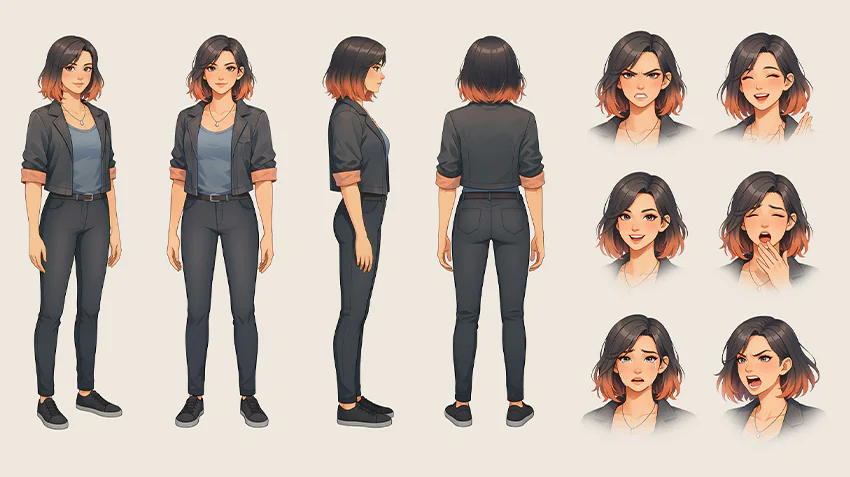
Step 1: Generate Character Reference Sheets
Before creating videos, I recommend building a complete character package using a text to image AI generator.
Useful reference assets include:
- Turnaround Sheet
- Multi-view Sheet
- Head Turnaround
- Expression Sheet
- Emotion Sheet
- Costume Sheet
- Color Script
- Proportion Sheet
These assets help the model understand exactly how the character should appear from different perspectives.
Step 2: Generate Videos Using References
Once the character package is ready, use an image to video AI generator or reference-based video generator.

Best practices include:
- Use the same reference image throughout the project
- Keep clothing references consistent
- Provide multiple angle references
- Use close-up face references when possible
- Avoid changing character descriptions between prompts
Final Thoughts
Character consistency has improved dramatically over the past year, but not all models perform equally well. In my testing, Kling 3.0, Seedance 2.0, and Veo 3.1 currently lead the market for maintaining a stable character across multiple scenes.
The model matters, but the preparation matters just as much. A well-designed character reference package often produces larger improvements than switching models. If your goal is professional-quality AI video production, investing time in character sheets, expressions, outfits, and multi-angle references will consistently improve results.
FAQ
What is character consistency in AI video generation?
Character consistency refers to the ability of an AI model to keep the same person’s appearance stable throughout a video, including facial features, hairstyle, clothing, and body proportions.
Which AI video model has the best character consistency in 2026?
Based on this comparison, Kling 3.0 delivered the strongest overall performance, followed closely by Seedance 2.0 and Veo 3.1.
Do I need reference images for consistent characters?
Yes. Reference images significantly improve identity preservation across scenes and camera angles.
What is a Character Reference Sheet?
A Character Reference Sheet is a collection of design images that define a character’s appearance from multiple angles and expressions. It often includes turnaround sheets, expression sheets, costume sheets, and proportion guides.
Can text to video models maintain the same character without references?
Some models can achieve basic consistency from prompts alone, but reference images almost always produce better and more reliable results.
Is image to video better than text to video for character consistency?
In most cases, yes. An image to video AI model starts from a fixed character image, which greatly improves consistency compared to prompt-only generation.
How many reference images should I prepare?
For professional projects, I recommend at least one front-facing portrait, one turnaround sheet, one expression sheet, and one outfit sheet. More references generally lead to more stable results.
To read more content like this, explore The Brand Hopper
Subscribe to our newsletter